お問い合わせ Customer support 客服
よくある質問 Q & A 常见问题
- ご購入前 Before Purchase 购买前
- ご購入後 After Purchase 购买后
- サポート窓口はありますか? Is there a support desk? 有客服窗口吗?
-
英語、中国語、日本語に対応したお電話のサポート窓口とチャットサポートを用意しています。
-
サポートセンター
TEL:03-5205-4999
※ 年中無休 9:00~19:00
※ 英語・中国語・日本語に対応しています。
※ 24時間対応 We offer phone and chat support in English, Chinese, and Japanese.-
Support Center
TEL:03-5205-4999
Available every day from 9:00 to 19:00
Support available in English, Chinese, and Japanese
Available 24/7 我们提供支持英语、中文和日语的电话客服和聊天支持。-
客服中心
电话:03-5205-4999
※ 全年无休,服务时间为9:00~19:00
※ 支持英语、中文和日语
※ 24小时服务 -
サポートセンター
- Japan Travel SIMの利用方法を教えてください。 How do I use the Japan Travel SIM? 如何使用 Japan Travel SIM?
-
Japan Travel SIMはご利用の端末の設定およびメールアドレスの登録を行うことでご利用いただけます。
ご利用の流れは以下をご確認ください。
Japan Travel SIMのご利用の流れ You can use the Japan Travel SIM by configuring your device settings and registering your email address.
Please refer to the following link for the usage procedure:
Easy to Use 通过设置您的设备并注册电子邮件地址,即可使用 Japan Travel SIM。
请参考以下链接了解使用流程:
使用流程 - 5G通信に対応していますか? Does it support 5G connectivity? 是否支持5G通信?
-
5G対応のJAPAN TRAVEL SIMでは、5G通信を利用できます。
4G(LTE)のみ対応の商品もあるため、購入前にパッケージをご確認ください。 You can use 5G connectivity with the 5G-compatible JAPAN TRAVEL SIM.
Since some products support only 4G (LTE), please check the package before purchasing. 支持5G的JAPAN TRAVEL SIM可以使用5G通信。
也有仅支持4G(LTE)的商品,购买前请确认包装。 - 利用可能な端末の条件を教えてください。 What are the requirements for compatible devices? 可用设备的条件是什么?
-
SIMフリー端末での利用を推奨しています。
ただし、SIMフリー端末であっても、端末の仕様によっては利用できない場合があります。eSIMを利用する場合は、eSIM対応端末が必要です。- 中国本土向けのiPhoneは、モデルによってeSIMを利用できない場合があります。ご利用端末のeSIM対応状況を事前にご確認ください。
SIMフリー端末を含め、ご利用端末について以下の点もご確認ください。- NTTドコモの5Gまたは4G(LTE)に対応していること
- IIJmioのAPN設定を行い、接続できること
動作確認済みの端末は、動作確認端末一覧をご確認ください。We recommend using a SIM-free device.- SIMカードを利用する場合、端末によってはSIMカードを認識しないことがあります。
- 各種アプリの動作確認は行っていません。
However, even with a SIM-free device, the service may not be available depending on the device’s specifications.If you plan to use an eSIM, you’ll need an eSIM-compatible device.- Depending on the model, iPhones intended for use in mainland China may not support eSIM. Please check your device’s eSIM compatibility in advance.
Please also verify the following points regarding your device, including SIM-free devices:- The device must support NTT Docomo’s 5G or 4G (LTE)
- The device must be able to connect after configuring the IIJmio APN settings
For a list of devices that have been verified to work with this service, please see List of Verified Devices.推荐在无锁版设备上使用。- When using a SIM card, some devices may not recognize it.
- We have not verified the functionality of various apps.
但即使是无锁版设备,部分设备规格可能无法使用。使用eSIM时,需要支持eSIM的设备。- 中国大陆版iPhone的部分型号可能无法使用eSIM。请提前确认使用设备的eSIM支持情况。
包括无锁版设备在内,请同时确认使用设备的以下内容:- 支持NTT Docomo 5G或4G(LTE)
- 进行IIJmio的APN设置并可连接
已确认可用的设备,请见确认可用设备列表。- 使用SIM卡时,部分设备可能无法识别SIM卡。
- 未确认各类APP可用。
- 設定完了後、インターネットに接続できません。 I can't connect to the internet after completing the setup. 完成设置后无法连接互联网怎么办?
-
以下をご確認ください。
- 端末を再起動する
- モバイルデータ通信がオンになっていることを確認する
- 機内モードがオフになっていることを確認する
設定内容を確認する場合は、以下をご確認ください。Please check the following:
[SIMカードの設定方法]
[eSIMの設定方法]-
eSIMをご利用の場合
インターネットに接続できない場合でも、eSIMを削除しないでください。改善しない場合は、サポートセンターへお問い合わせください。 -
iPhoneで「LTE」と表示されない場合
端末によっては、再起動後に画面上部へ「LTE」と表示されるまで、15分程度かかる場合があります。 -
一部のAndroid端末で接続できない場合
2026年4月1日以降に接続できない場合は、端末のソフトウェアを最新バージョンに更新し、以下をお試しください。
手順1.ネットワークの種類を、5Gまたは4G(LTE)を含む設定に変更する
手順2.APN設定の「APNタイプ」に「ia」を追加する
【設定例】
変更前:default
変更後:default,ia- 既存の設定は変更せず、「ia」を追加してください。
- Restart your device
- Make sure Mobile Data is turned on
- Make sure Airplane Mode is turned off
To check your settings, please refer to the following.请确认以下内容:
[How to Set Up Your SIM Card]
[How to Set Up an eSIM]-
If you are using an eSIM
Even if you cannot connect to the Internet, do not delete the eSIM. If the issue persists, please contact the Support Center. -
If "LTE" Does Not Appear on Your iPhone
Depending on the device, it may take about 15 minutes for “LTE” to appear at the top of the screen after restarting. -
If You Cannot Connect on Certain Android Devices
If you are unable to connect on or after April 1, 2026, update your device’s software to the latest version and try the following:
Step 1. Change the network type to a setting that includes 5G or 4G (LTE)
Step 2. Add “ia” to the APN Type field in the APN settings
[Example Settings]
Before change: default
After: default,ia- Please do not change the existing settings; simply add “ia.”
- 重启设备
- 确认移动数据通信已开启
- 确认飞行模式已关闭
确认设置内容时,请确认以下内容:
[SIM卡的设置方法]
[eSIM的设置方法]-
使用eSIM时
即使无法连接互联网,也请勿删除eSIM。如无改善,请联系支持中心。 -
iPhone不显示“LTE”时
部分设备重启后可能需要约15分钟,屏幕顶部才会显示“LTE”。 -
部分Android设备无法连接时
2026年4月1日以后仍无法连接时,请将设备软件更新至最新版本,并尝试以下操作:
步骤1.将网络类型更改为包含5G或4G(LTE)的设置
步骤2.在APN设置的“APN类型”中添加“ia”
【设置示例】
更改前:default
更改后:default,ia- 请勿更改原有设置,直接添加“ia”。
- 【iPhoneの場合】再起動後に5Gまたは4G(LTE)へ接続されるまで時間がかかる、またはアンテナ表示がグレーになります。 [For iPhone] After restarting, it may take some time to connect to 5G or 4G (LTE), or the signal bars may appear grayed out. 【iPhone】重启后连接5G或4G(LTE)需要时间,或天线显示灰色。
-
iOS 26以降のiPhoneでは、再起動直後などに、5Gまたは4G(LTE)へ接続されるまで時間がかかったり、アンテナ表示がグレーになったりする場合があります。
-
5Gまたは4G(LTE)への接続に時間がかかる場合
接続まで1~2分程度かかる場合があります。
接続するまで、一時的に「圏外」と表示される場合があります。
機内モードをオン/オフすると、早く接続できる場合があります。
接続後は、そのままご利用いただけます。 -
アンテナ表示がグレーになる場合
アンテナ表示がグレーでも、データ通信を利用できる場合は、そのままご利用いただけます。
機内モードのオン/オフやAPN設定を行っても、表示が改善しない場合があります。データ通信を利用できる場合は、設定を変更せずにご利用ください。- ご利用の端末によって、発生する事象が異なる場合があります。
-
If it takes time to connect to 5G or 4G (LTE)
It may take about 1 to 2 minutes to connect.
Until a connection is established, “No Service” may temporarily appear on the screen.
Turning Airplane Mode on and off may help to connect faster.
Once connected, you can use your device as usual. -
If the signal bar turns gray
Even if the signal bar appears grayed out, you can continue using the service as long as data communication is available.
Turning Airplane Mode on or off or adjusting your APN settings may not resolve this issue. If you can still use data, please continue using the service without changing your settings.- The symptoms you experience may vary depending on your device.
-
连接5G或4G(LTE)需要时间时
连接可能需要约1~2分钟。
连接前可能暂时显示“无服务”。
开启/关闭飞行模式,有时可加快连接。
连接后即可直接使用。 -
天线显示灰色时
即使天线显示为灰色,只要能使用数据通信,即可直接使用。
即使开启/关闭飞行模式或进行APN设置,显示也可能不会改善。只要能使用数据通信,请勿更改设置直接使用。- 根据使用的设备,出现的情况可能不同。
-
5Gまたは4G(LTE)への接続に時間がかかる場合
- 誤って購入してしまいました。パッケージの返品・交換はできますか? I purchased it by mistake. Can I return or exchange the package? 我不小心购买了,可以退换包装吗?
- Japan Travel SIMはパッケージの返品・交換はできません。 Japan Travel SIM packages cannot be returned or exchanged. Japan Travel SIM 的包装不可退货或更换。
- 「認証コード」が記載されたメールが届きません。 I haven’t received the email with the verification code. 我没有收到包含“验证码”的邮件。
-
メールが届かない場合、下記をご確認ください。
-
システムメンテナンス中はメールが届きません。メンテナンス終了後にメールがとどきます。
-定期メンテナンスは毎週火曜日の午後10時から水曜日の午前9時までおこないます。
-メンテナンスのお知らせ - 認証コードが記載されたメールは、「support@iijmio.jp」のメールアドレスで送信されます。迷惑メールフォルダなどの中に入っていないか一度ご確認ください。
- 登録したメールアドレスを再度ご確認ください。
上記確認後もメールが届かない場合は、他のメールアドレスにてお試しください。 If you haven’t received the email, please check the following:-
Emails will not be delivered during system maintenance. They will be sent after maintenance is completed.
-Regular maintenance is conducted every Tuesday from 10:00 PM to Wednesday 9:00 AM.
-Maintenance information - The email containing the verification code is sent from support@iijmio.jp. Please check your spam or junk mail folder.
- Please double-check the email address you registered.
If you still do not receive the email after checking the above, please try using a different email address. 如果没有收到邮件,请确认以下事项:-
系统维护期间不会发送邮件。维护结束后邮件将会发送。
-定期维护时间为每周二晚上10点至周三早上9点。
-维护通知 - 含有验证码的邮件是由 support@iijmio.jp 发出的。请检查是否被误归类到垃圾邮件文件夹中。
- 请再次确认您注册时填写的邮箱地址是否正确。
如果确认以上内容后仍未收到邮件,请尝试使用其他邮箱地址。 -
システムメンテナンス中はメールが届きません。メンテナンス終了後にメールがとどきます。
- 「PASSCODE」が記載されたメールが届きません。 I haven’t received the email containing the "PASSCODE". 我没有收到包含“PASSCODE”的邮件。
-
メールが届かない場合、下記をご確認ください。
-
システムメンテナンス中はメールが届きません。メンテナンス終了後にメールが届きます。
-定期メンテナンスは毎週火曜日の午後10時から水曜日の午前9時までおこないます。
-メンテナンスのお知らせ - メールは、「support@iijmio.jp」のメールアドレスで送信されます。迷惑メールフォルダなどの中に入っていないか一度ご確認ください。
-
Emails will not be delivered during system maintenance. They will be sent after maintenance is completed.
-Regular maintenance is conducted every Tuesday from 10:00 PM to Wednesday 9:00 AM.
-Maintenance information - The email is sent from support@iijmio.jp. Please check your spam or junk mail folder.
-
系统维护期间不会发送邮件。维护结束后邮件将会发送。
-定期维护时间为每周二晚上10点至周三早上9点。
-维护通知 - 邮件是由 support@iijmio.jp 发出的。请检查是否被误归类到垃圾邮件文件夹中。
-
システムメンテナンス中はメールが届きません。メンテナンス終了後にメールが届きます。
- PASSCODE1/PASSCODE2、エントリーコードはどこで確認できますか。 Where can I find PASSCODE1/PASSCODE2 and the entry code? 在哪里可以找到 PASSCODE1/PASSCODE2 和注册码?
-
利用者登録に必要とするPASSCODE1/PASSCODE2およびエントリーコードは、SIMカードとeSIMで異なります。
-
SIMカードをご利用の場合
PASSCODE1/PASSCODE2は**SIMカードの台紙**に記載しています。それぞれ8桁です。 -
eSIMをご利用の場合
エントリーコードは、購入したカードの裏面、または支払い後に発券されるシートに記載されています。
PASSCODE1/PASSCODE2は、登録完了後のメールに記載されています。
-
If you are using a SIM card
PASSCODE1 and PASSCODE2 are printed on the SIM card mount. Each code consists of 8 digits. -
If you are using an eSIM
The entry code is printed on the back of the purchased card or on the receipt issued after payment.
PASSCODE1 and PASSCODE2 are included in the email you receive after completing registration.
-
使用 SIM 卡的情况
PASSCODE1 和 PASSCODE2 印在 SIM 卡的卡托 上。每个密码为 8 位数字。 -
使用 eSIM 的情况
注册代码印在购买的卡片背面,或在付款后打印的收据上。
PASSCODE1 和 PASSCODE2 会在您完成注册后,通过电子邮件发送给您。
-
SIMカードをご利用の場合
- PINロックが掛かりました。PINロック解除コード(PUKコード)を教えてください。 My SIM is PIN-locked. Can you provide the PIN Unlock Code (PUK code)? SIM卡被PIN锁定了。可以提供PIN解锁码(PUK码)吗?
-
製造番号をご確認の上、IIJサポートセンターへご連絡ください。
-
製造番号の確認方法
-
SIMカードをご利用の場合
-SIMカード台紙の裏面、または端末の「設定」よりご確認いただけます。
-端末の設定画面から確認する場合
<iOSの場合>[設定]→[一般]→[情報]
<Androidの場合>[設定]→[デバイス情報]→[SIMステータス] -
eSIMをご利用の場合
-「ready to start」のメール、または端末の「設定」よりご確認いただけます。
-端末の設定画面から確認する場合
<iOSの場合>[設定]→[一般]→[情報]
<Androidの場合>[設定]→[デバイス情報]→[SIMステータス]
- OSのバージョンや端末により確認方法が異なります。
-
SIMカードをご利用の場合
-
ご連絡先
IIJサポートセンター 年中無休(9:00-19:00)
tel:03-5205-4999- 日本語・英語・中国語に対応しています。
-
How to check the serial number
-
For SIM card :
-You can find it on the back of the SIM card mount or in your device settings.
-To check via device settings:
<iOS> [Settings] → [General] → [About]
<Android> [Settings] → [About phone] → [SIM status] -
For eSIM :
-You can find it in the "Ready to Start" email or in your device settings.
-To check via device settings:
<iOS> [Settings] → [General] → [About]
<Android> [Settings] → [About phone] → [SIM status]
- The method may vary depending on your device and OS version.
-
For SIM card :
-
Contact Information
IIJ Support Center
TEL: 03-5205-4999- available year-round(9:00-19:00)
- Customer support is available in Japanese, English, and Chinese only.
-
如何确认序列号
-
使用SIM卡的用户:
-可在SIM卡台纸背面或设备的“设置”中查看。
-通过设备设置查看的方法:
<iOS> [设置] → [通用] → [关于本机]
<Android> [设置] → [关于手机] → [SIM状态] -
使用eSIM的用户:
-可在“ready to start”邮件中或设备的“设置”中查看。
-通过设备设置查看的方法:
<iOS> [设置] → [通用] → [关于本机]
<Android> [设置] → [关于手机] → [SIM状态]
注意:根据设备型号和操作系统版本,查看方法可能有所不同。 -
使用SIM卡的用户:
-
联系方式
IIJ客服中心(全年无休(9:00-19:00))
电话:03-5205-4999- 仅支持日语、英语、中文。
-
製造番号の確認方法
- 設定方法を教えてください。 How can I set up the SIM? 请告诉我设置方法。
-
パッケージに同梱されている「USER MANUAL」もしくは、以下をご参照の上、設定してください。
ご利用の流れ
SIMカードの場合
eSIMの場合-
5G通信について
端末によって、別途設定が必要な場合や、5G通信を利用できない場合があります。 詳しくは、こちらをご確認ください。
For SIM card
For eSIM-
About 5G Connectivity
Depending on your device, additional settings may be required, or 5G connectivity may not be available.
For more information, please see the Frequently Asked Questions.
设定方法
SIM卡
eSIM-
关于5G通信
部分设备可能需要另外设置或无法使用5G通信。
详情请见常见问题。
-
5G通信について
- 5G通信を利用するための設定方法を教えてください。 How do I configure my device to use 5G? 请告知使用5G通信的设置方法。
-
5G対応のJAPAN TRAVEL SIMで5G通信を利用する場合は、以下の設定をご確認ください。
- 端末やOSのバージョンによって、画面や項目名が異なる場合があります。
-
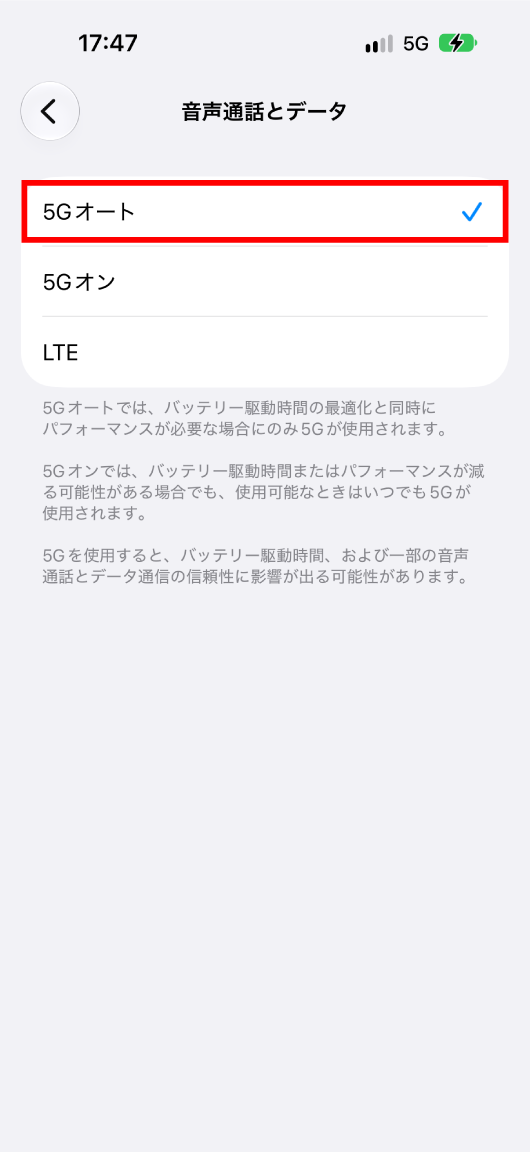
iOS
-
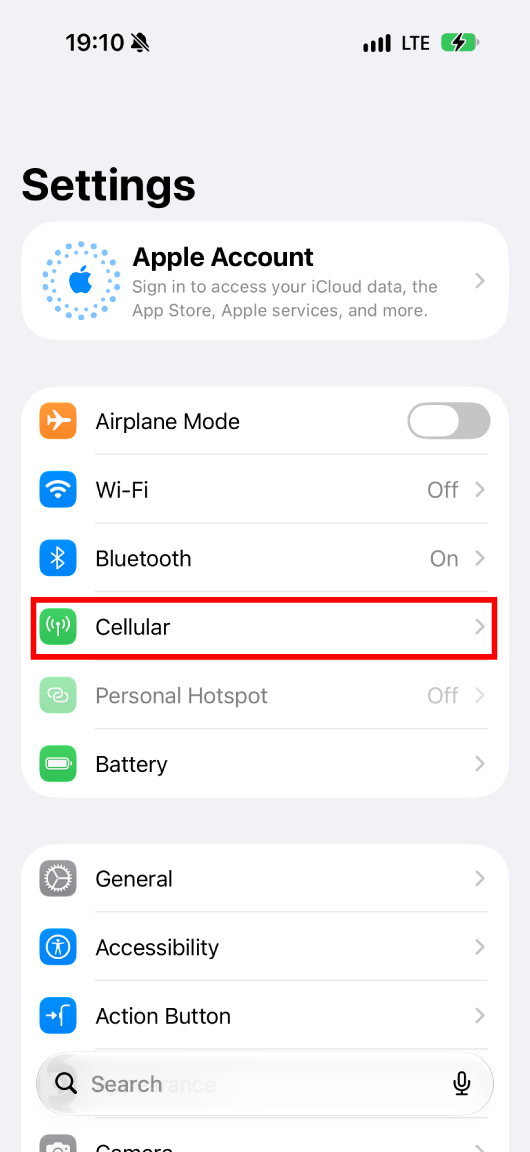
①「設定」→「モバイル通信」を選択します。
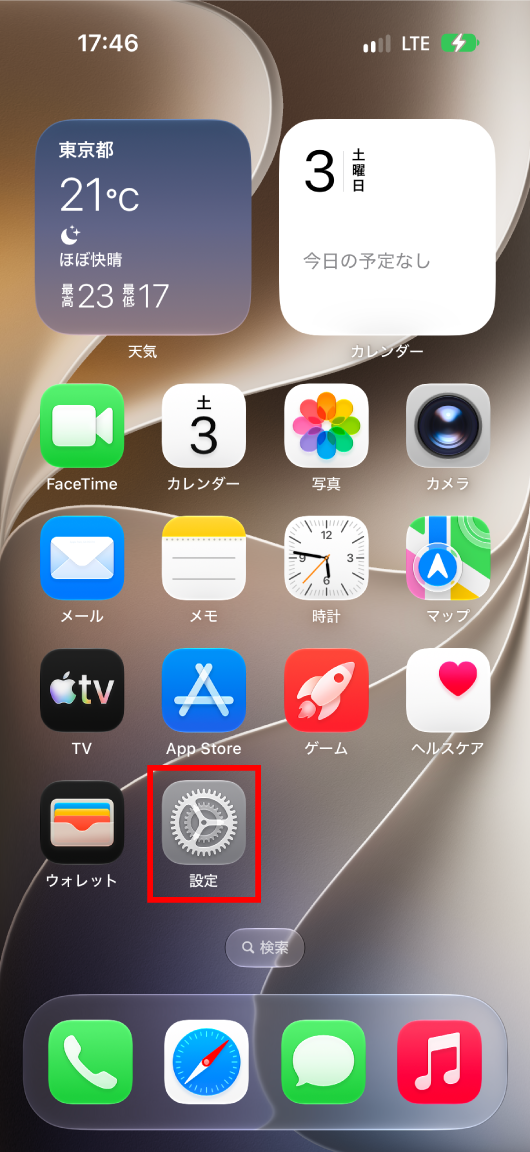
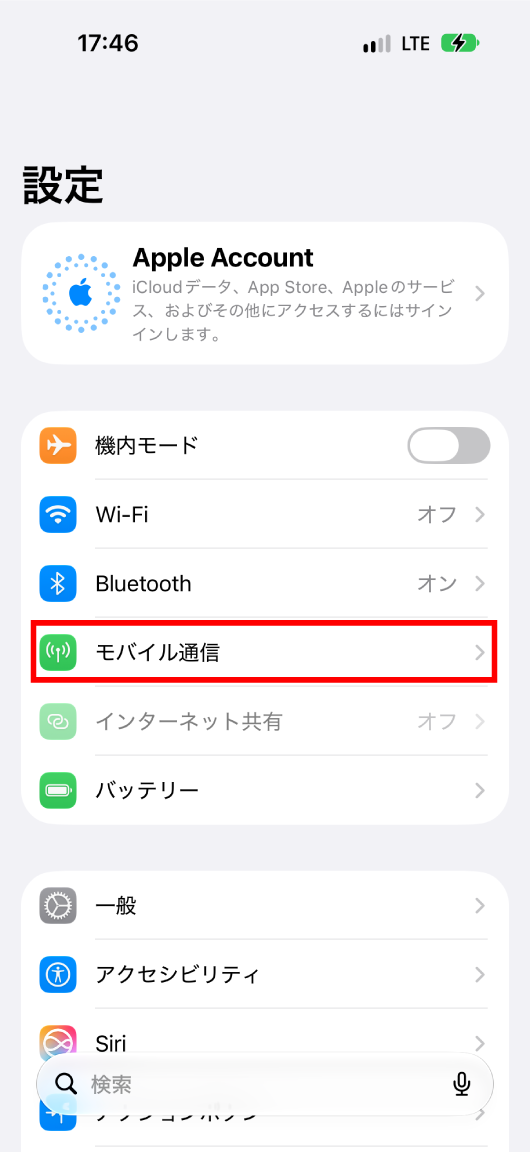
-
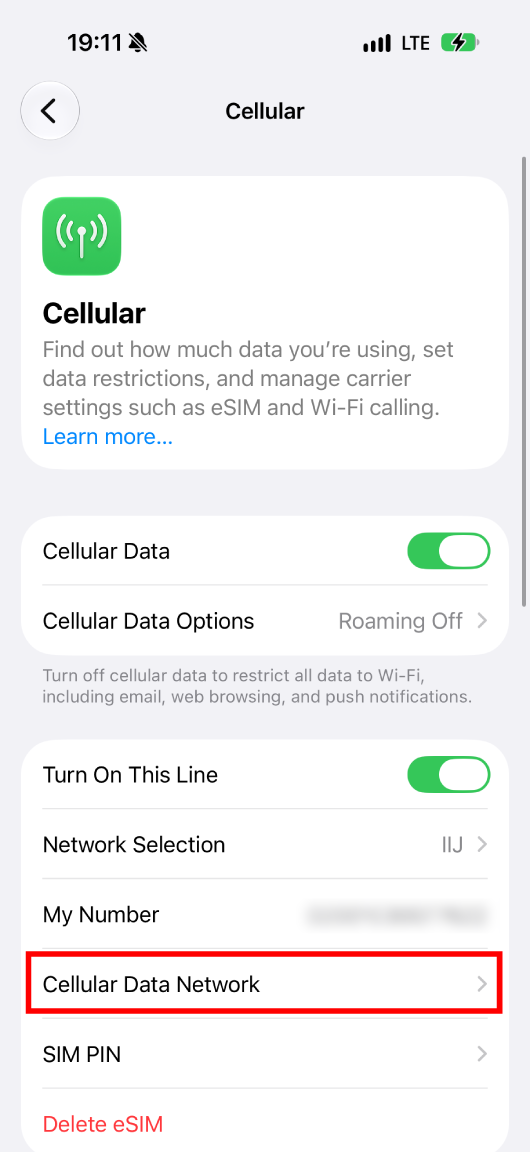
②「モバイルデータ通信のオプション」を選択します。
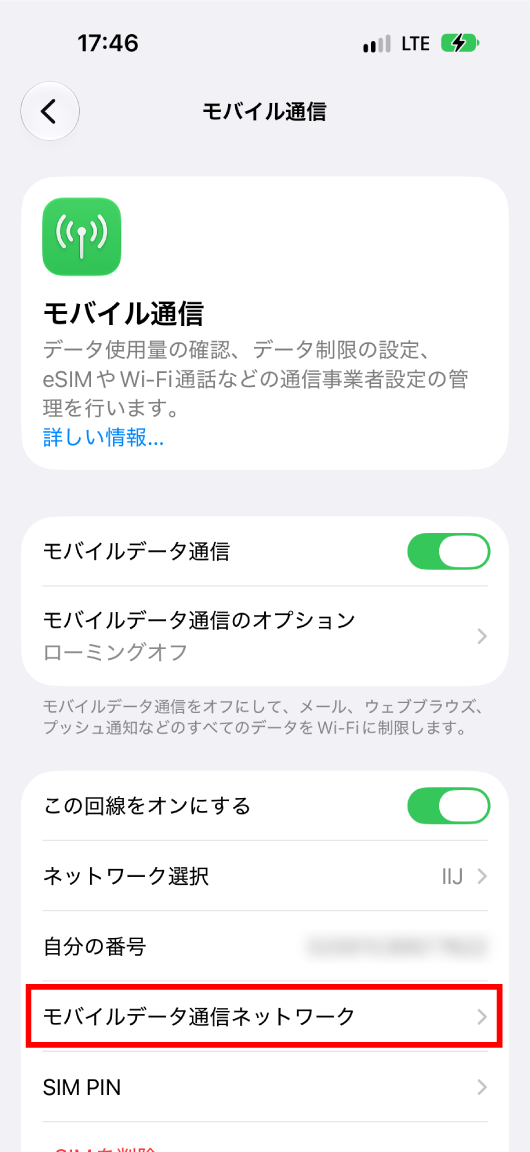
-
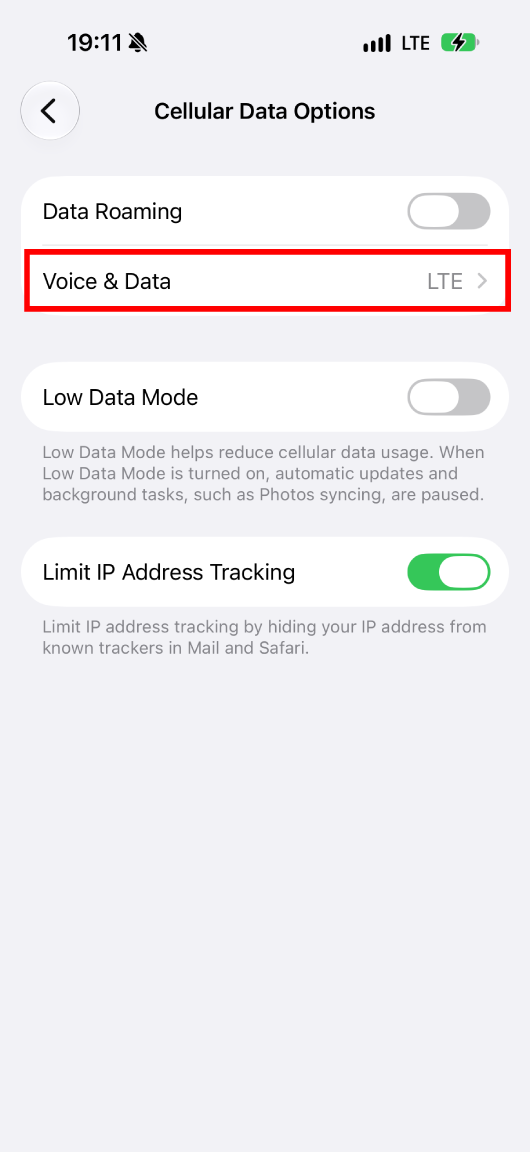
③「音声通話とデータ」を選択します。
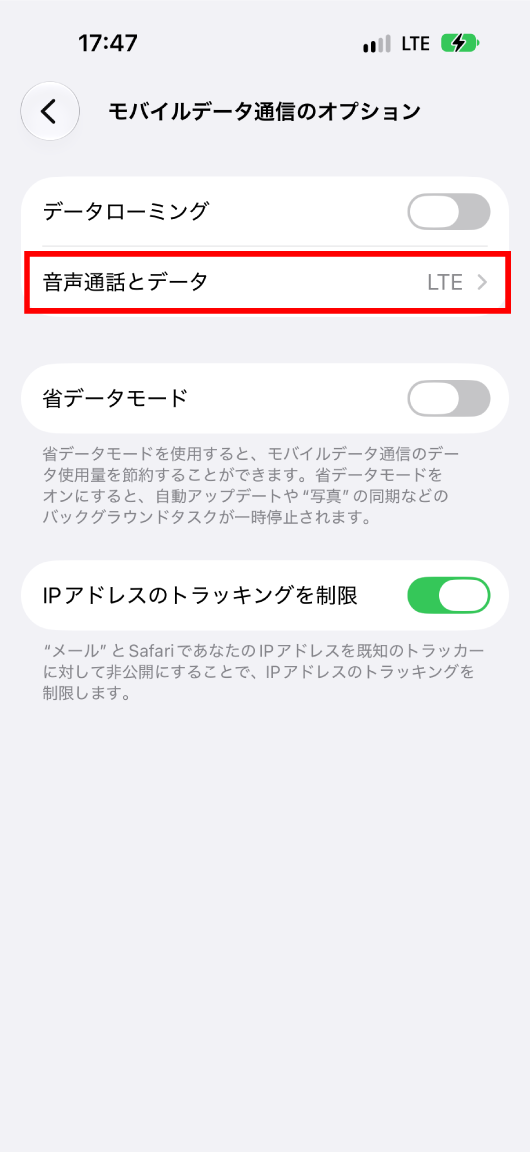
-
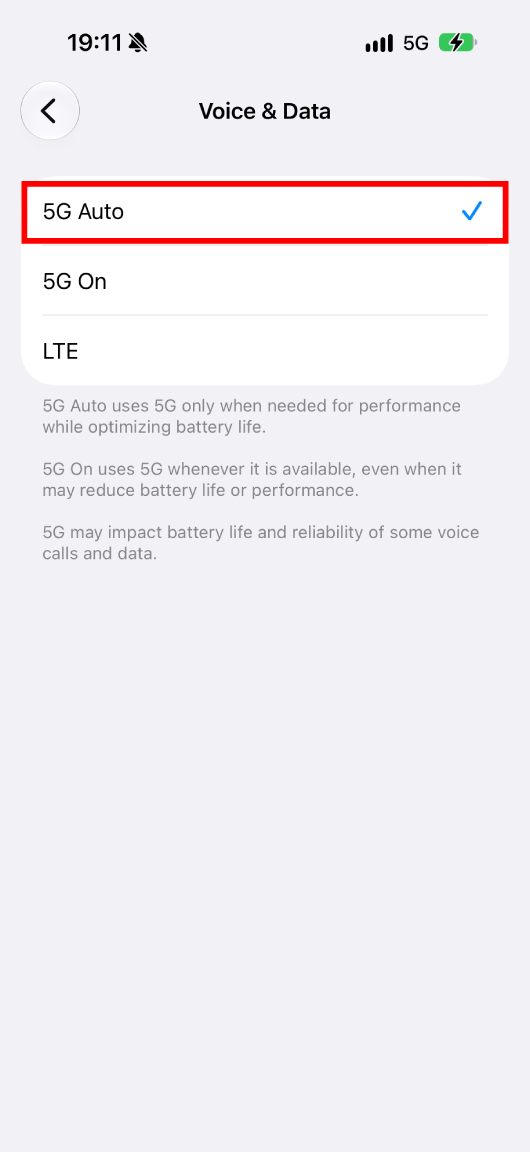
④「5Gオート」を選択します。
-
-
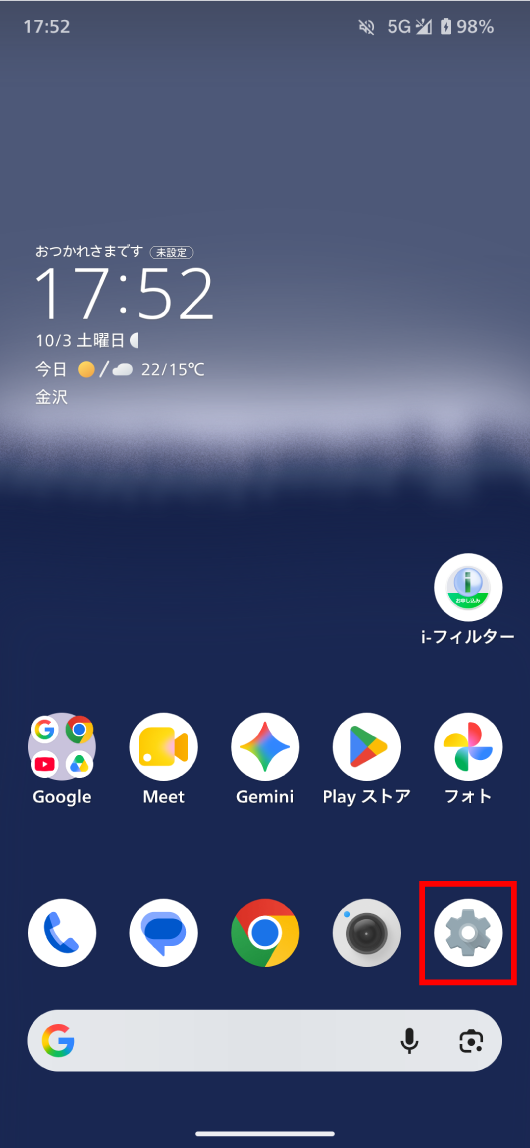
Android
- 一部のAndroid端末では、5G通信を利用できない場合があります。
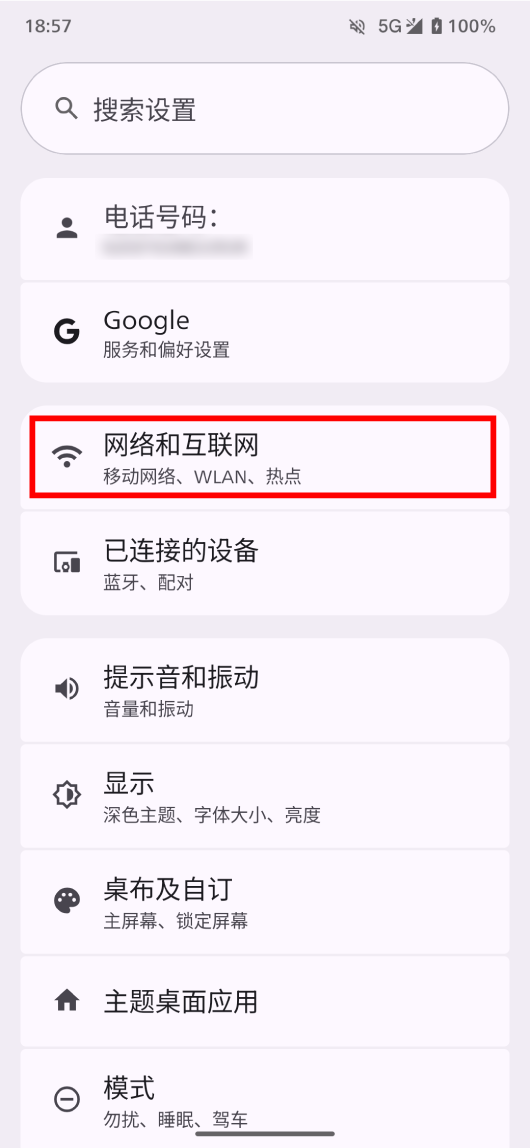
-
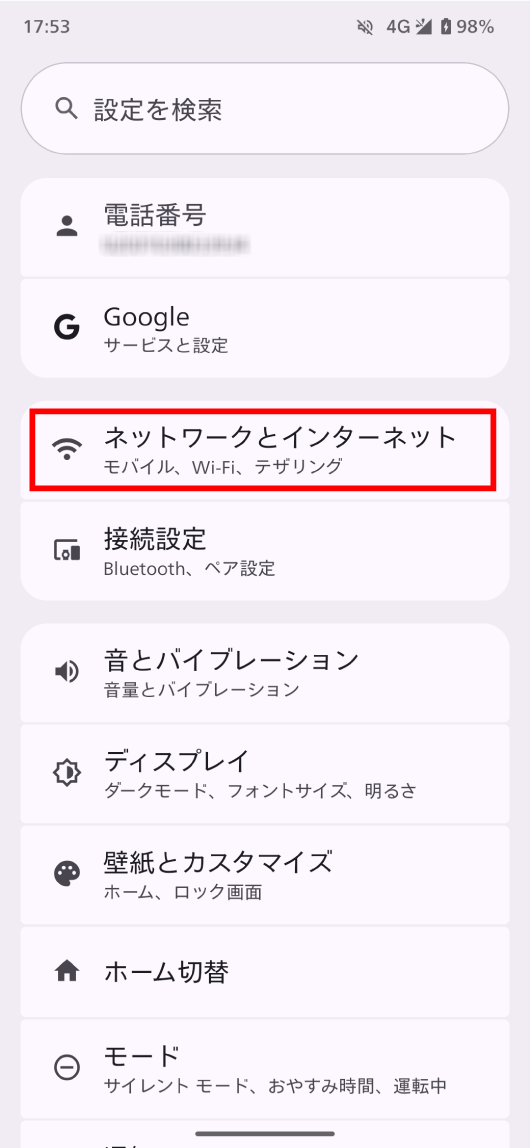
①「設定」→「ネットワークとインターネット」を選択します。
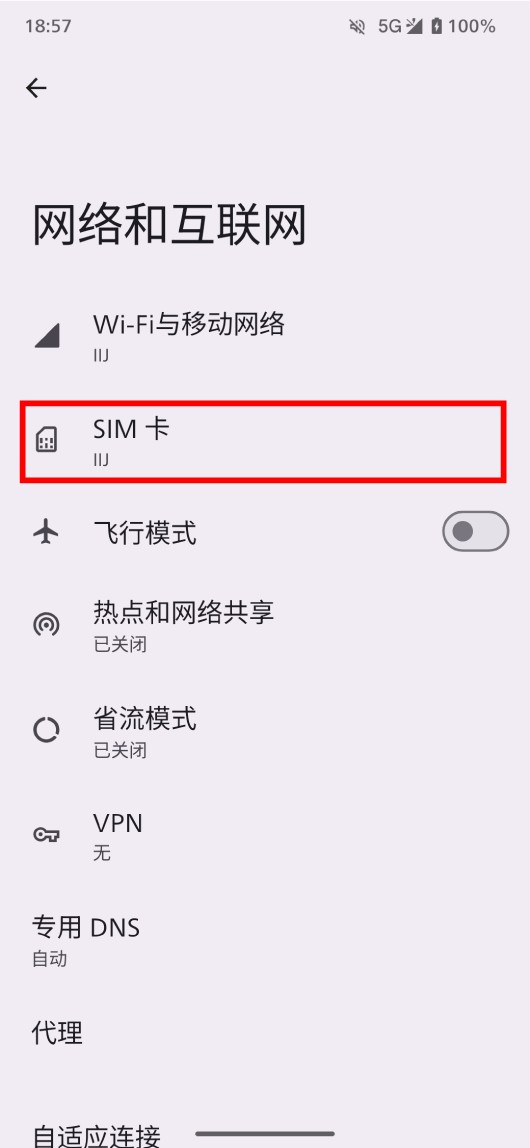
-
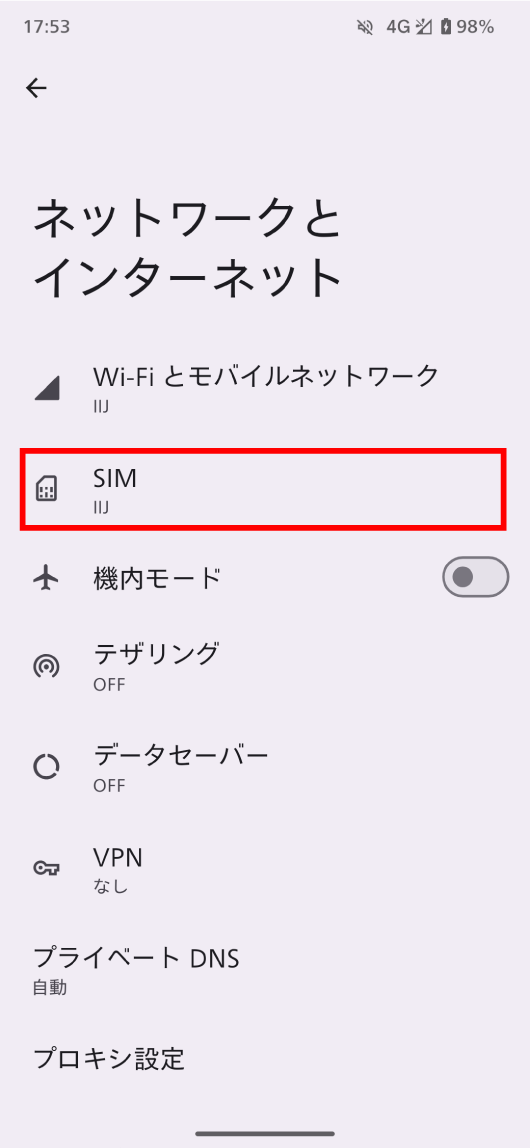
②「SIM」を選択します。
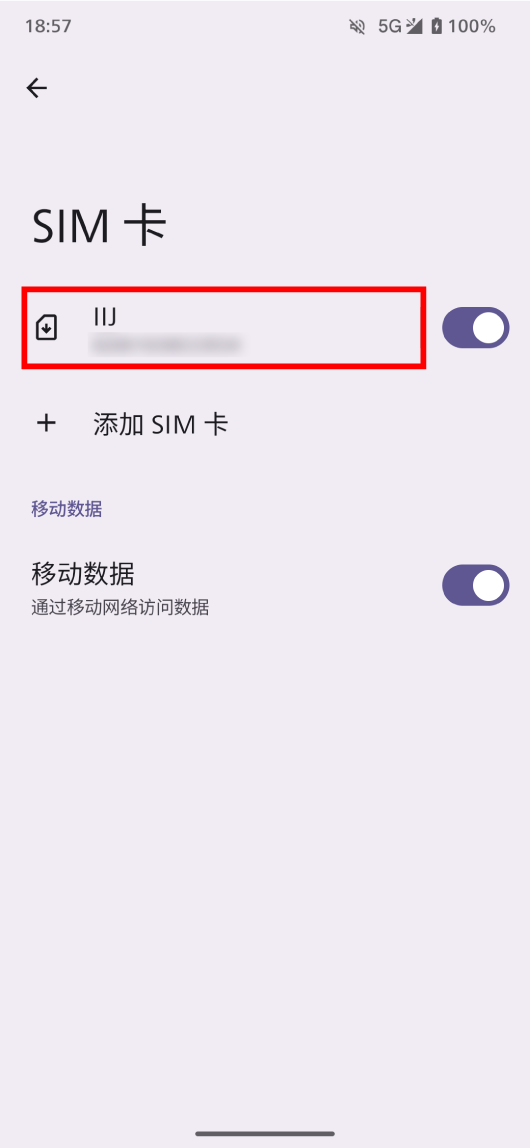
-
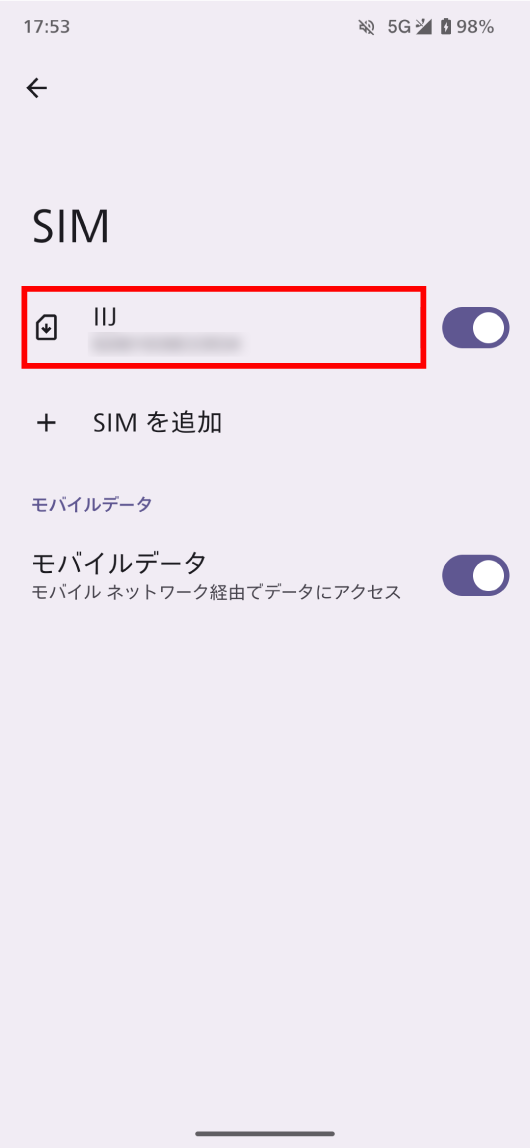
③「Japan Travel SIM(IIJ)」を選択します。
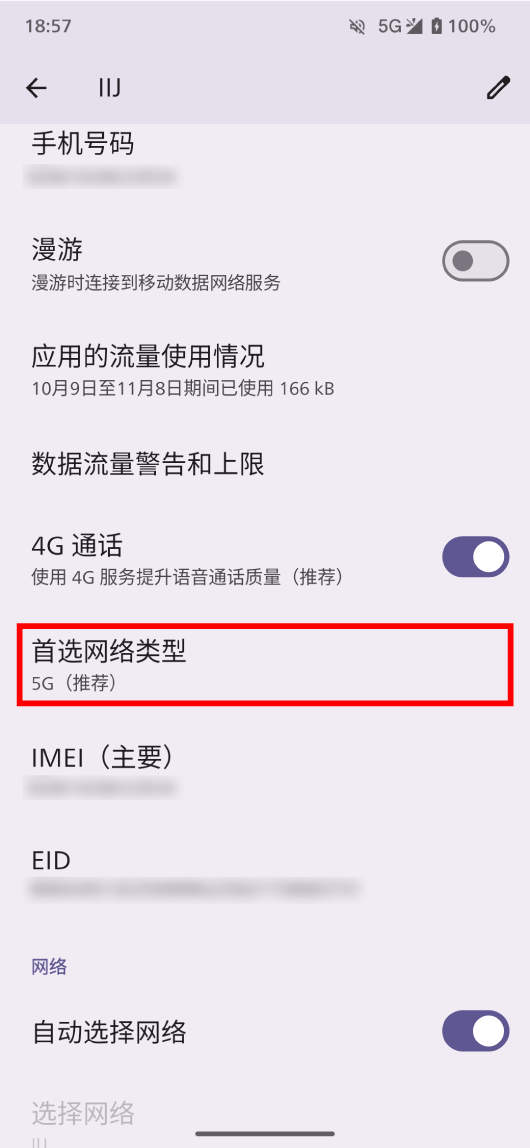
-
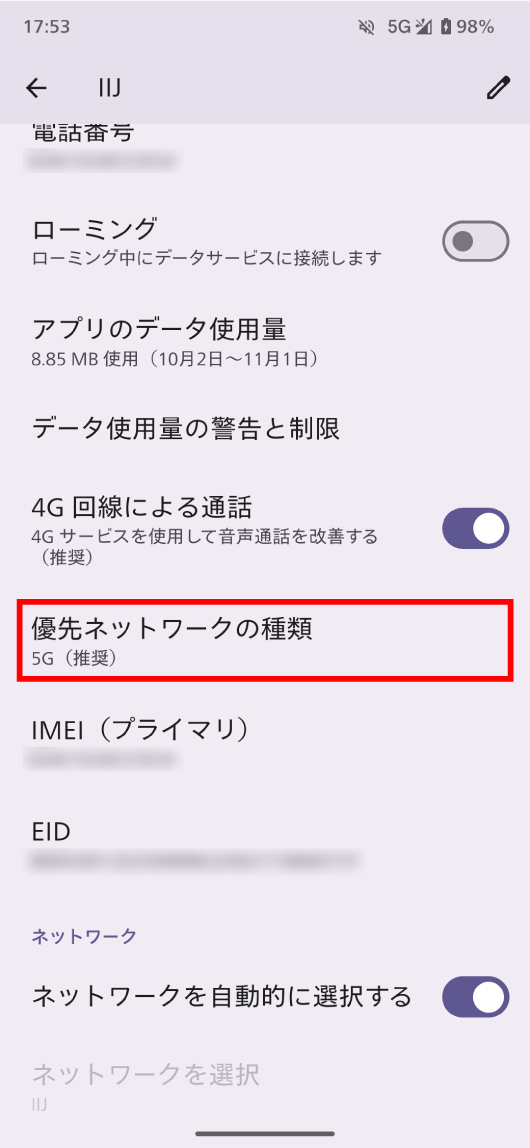
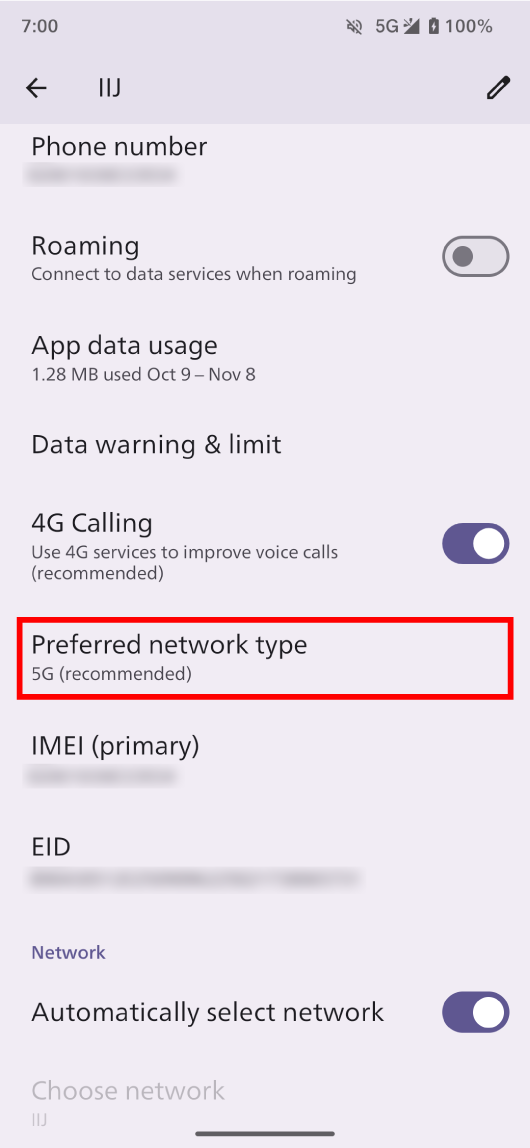
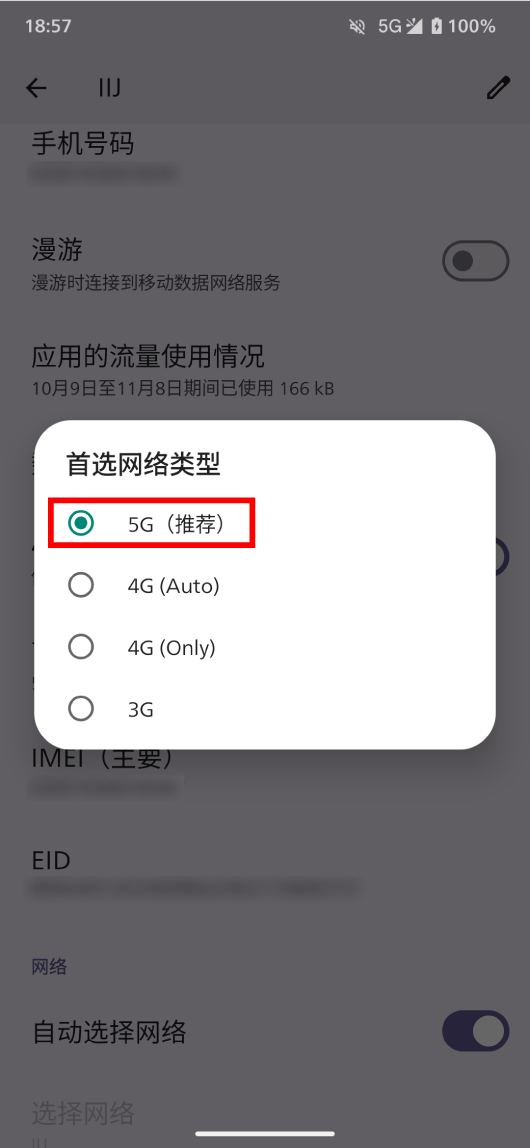
④「優先ネットワークの種類」を選択します。
-
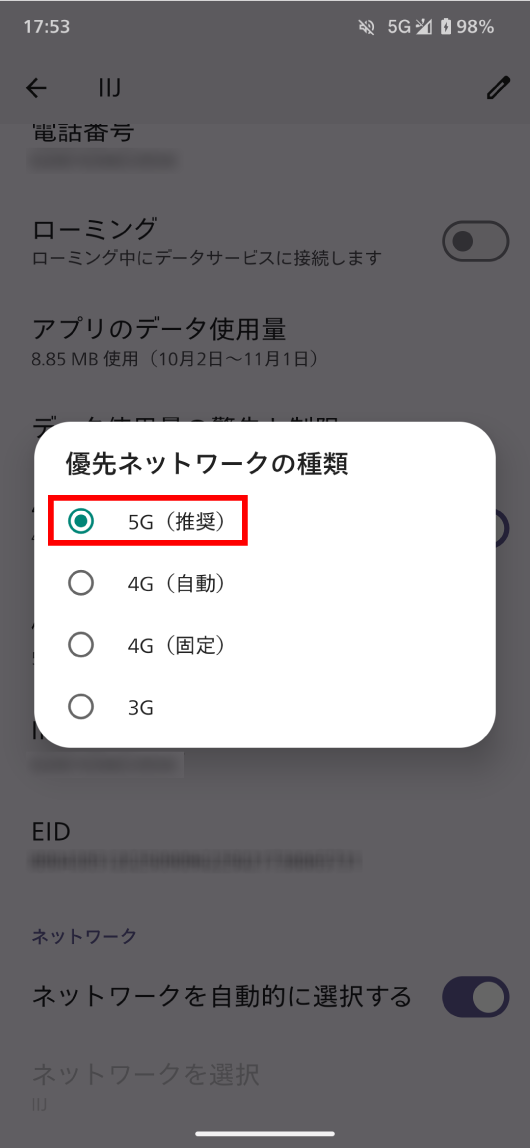
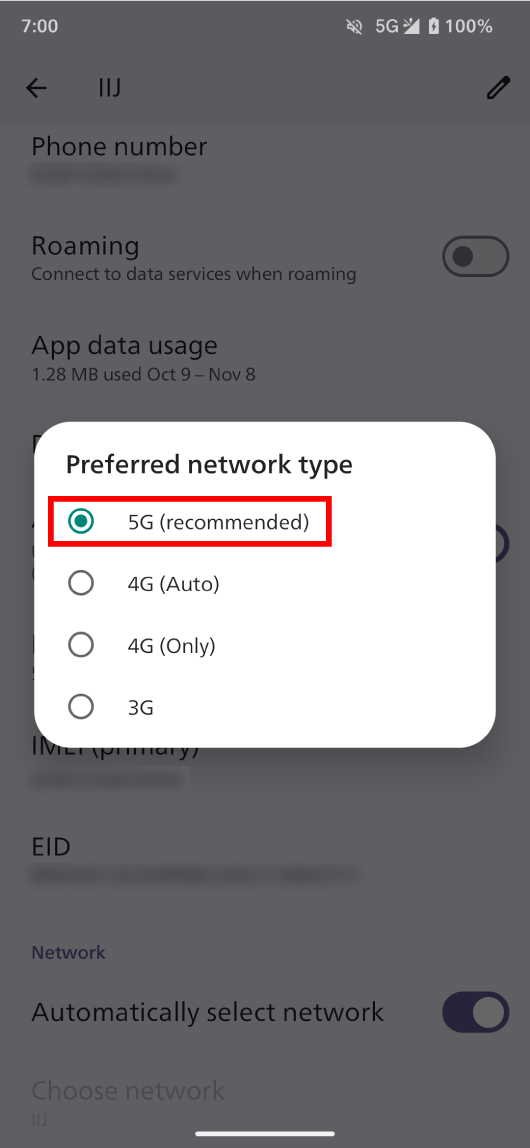
⑤「5G(推奨)」を選択します。
- Screen layouts and menu item names may vary depending on your device and OS version.
-
iOS
-
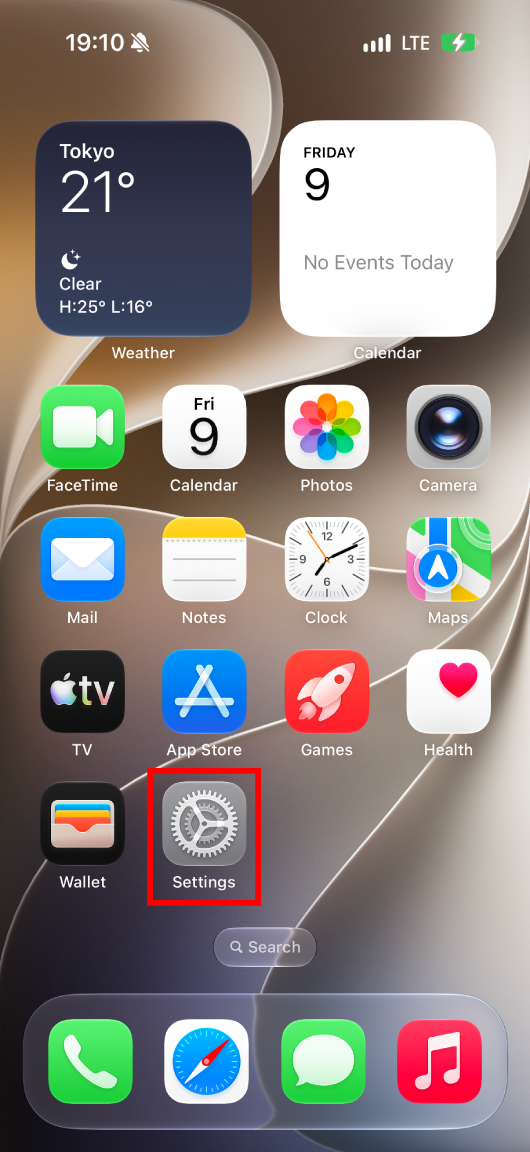
① Tap Settings → Cellular (or Mobile Service).
-
② Tap Mobile Data Options.
-
③ Tap Voice & Data.
-
④ Tap 5G Auto.
-
-
Android
- Some Android devices may not support 5G connectivity.
-
① Tap Settings → Network & Internet.
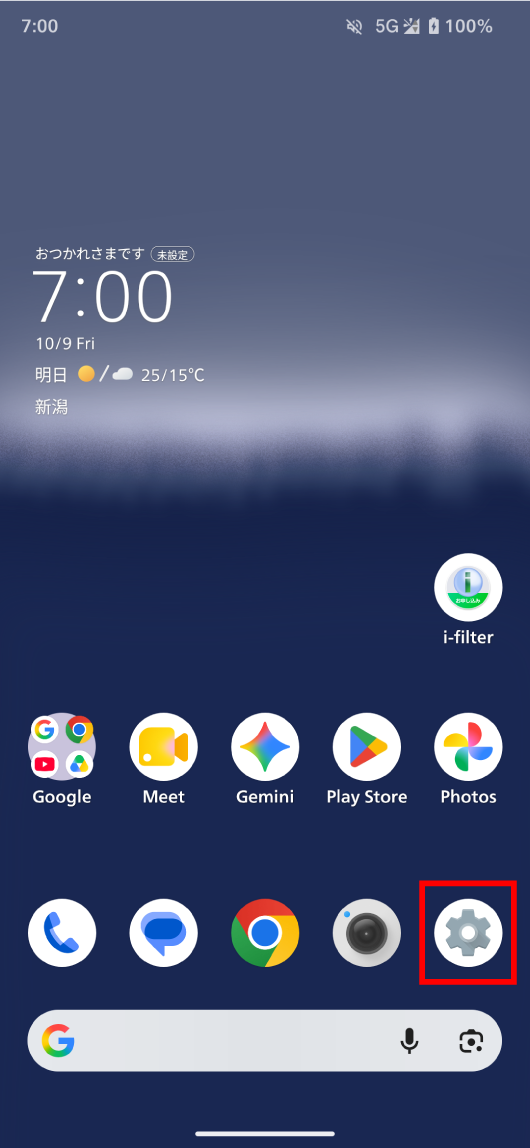
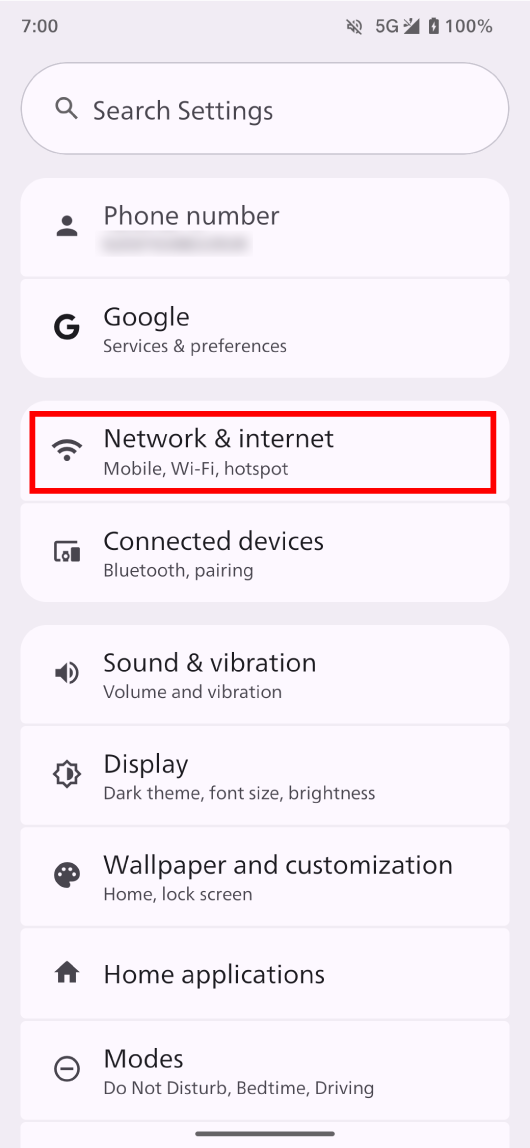
-
② Tap SIM.
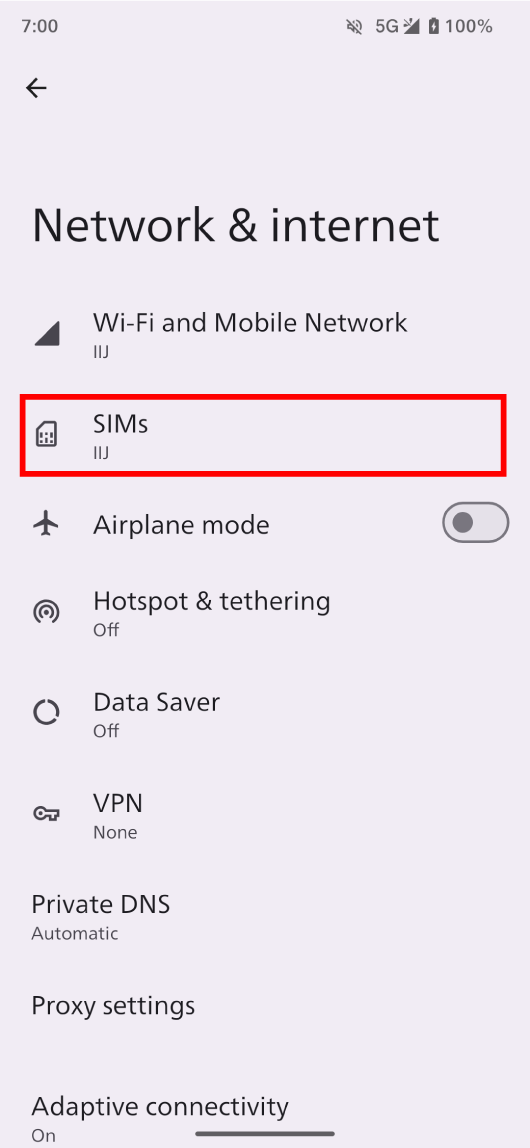
-
③ Select Japan Travel SIM (IIJ).
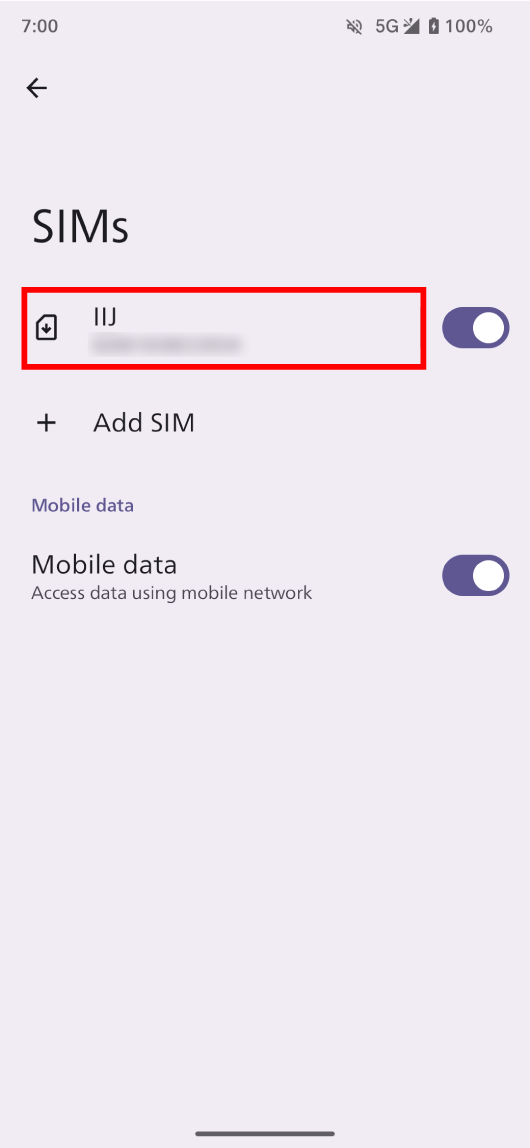
-
④ Tap Preferred Network Type.
-
⑤ Tap 5G (Recommended).
- 根据设备和OS版本,屏幕和项目名称可能不同。
-
iOS
-
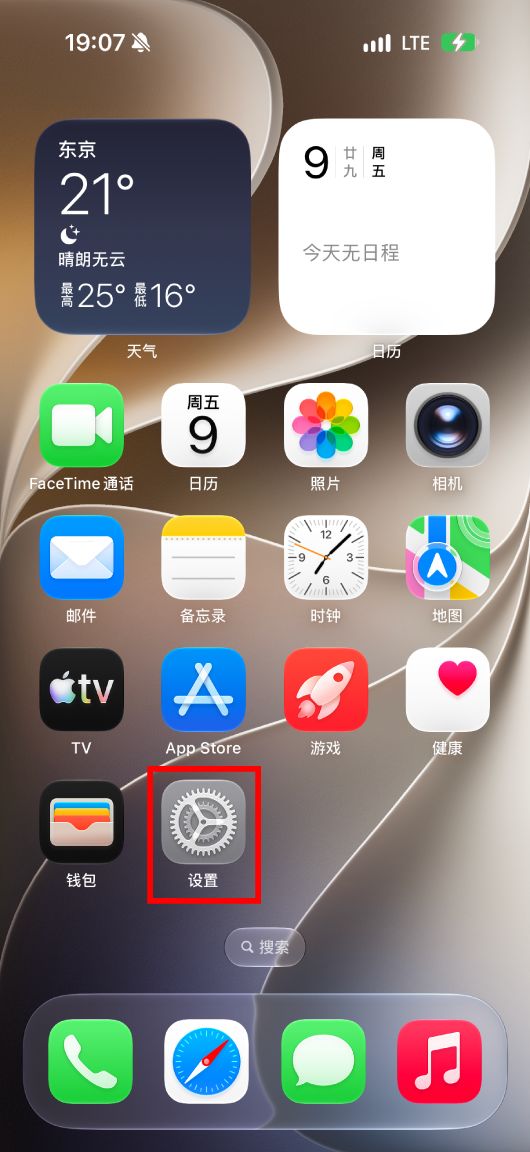
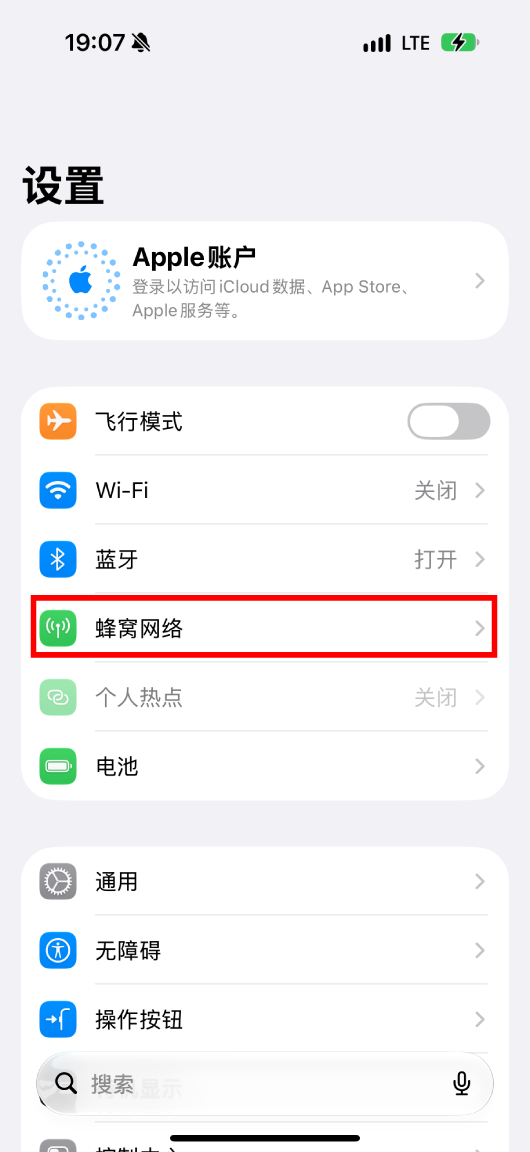
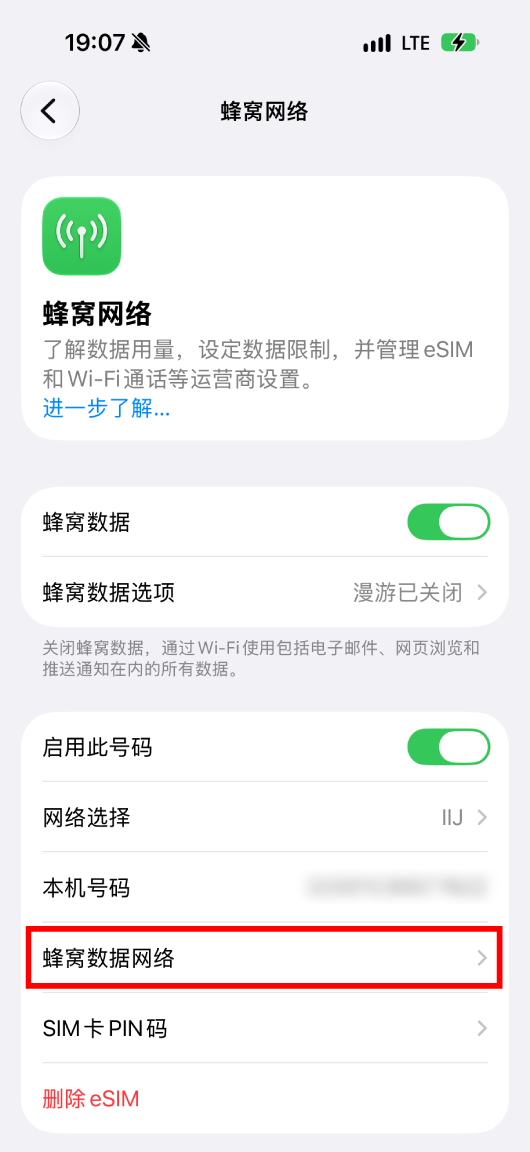
①选择“设置”→“蜂窝网络”。
-
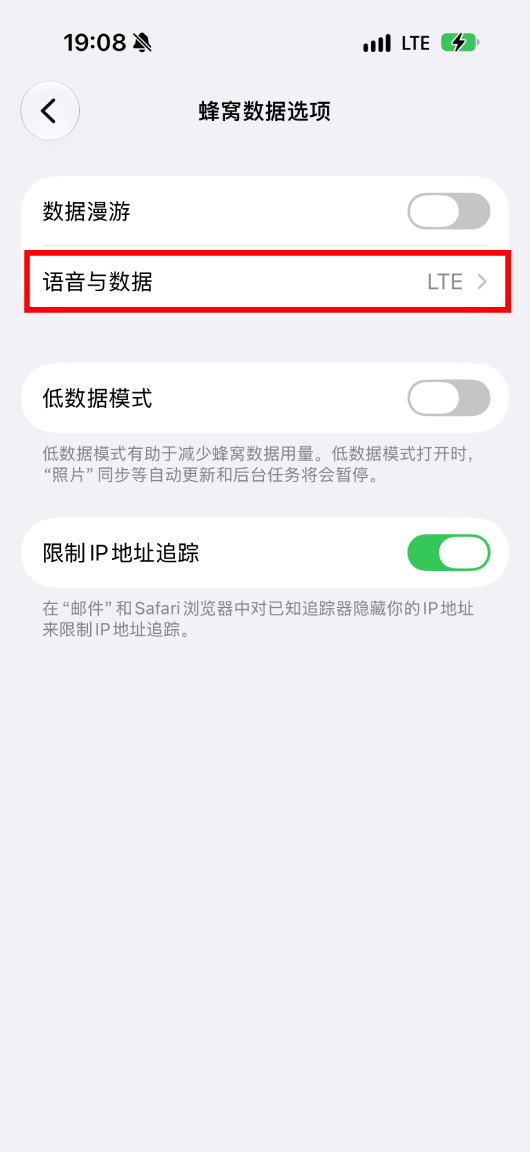
②选择“蜂窝数据选项”。
-
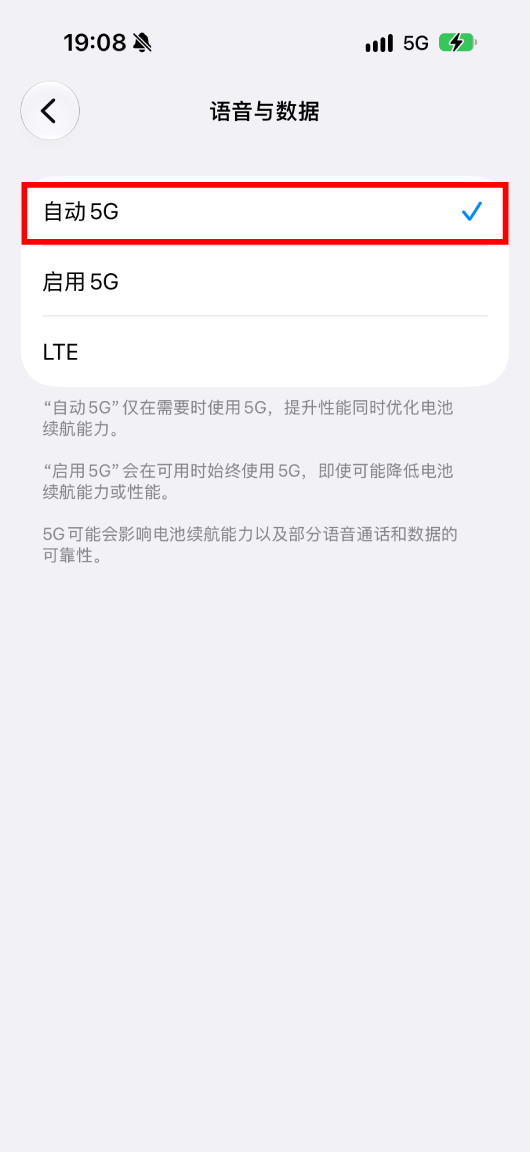
③选择“语音与数据”。
-
④选择“5G自动”。
-
-
Android
-
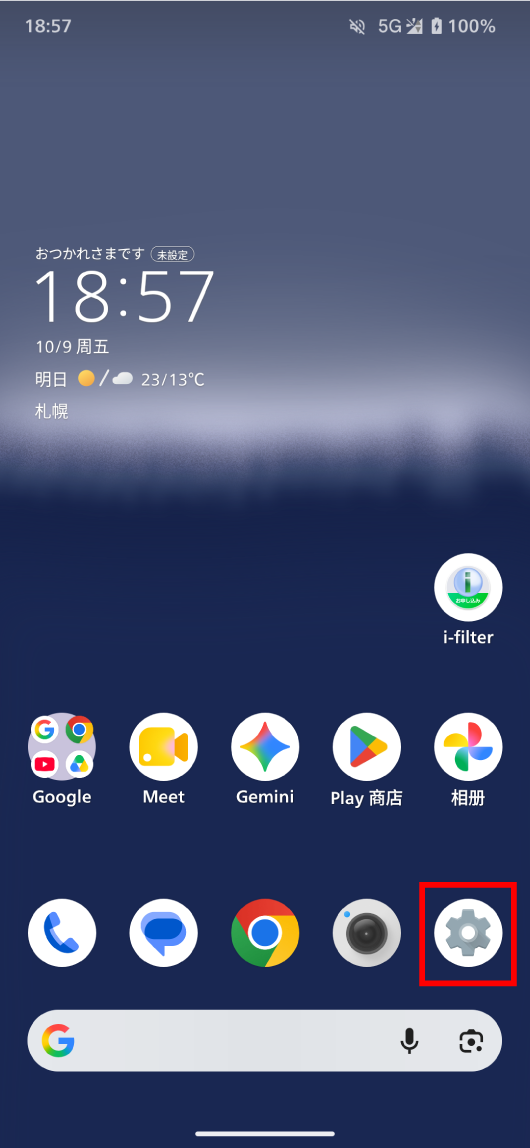
①选择“设置”→“网络和互联网”。
-
②选择“SIM”。
-
③选择Japan Travel SIM(IIJ)。
-
④选择“首选网络类型”。
-
⑤选择“5G(推荐)”。
-
- 【eSIMの場合】誤ってeSIMを削除してしてしまいました。eSIMの再発行はできますか? [For eSIM] I accidentally deleted my eSIM. Can it be reissued? 【使用eSIM时】我不小心删除了eSIM,可以重新发行吗?
-
eSIMの再発行はできません。
eSIMは一度削除されると再度のインストールができません。削除しないでご利用ください。
また、端末の初期化や機種変更をされますと、再度購入が必要となります。 eSIMs cannot be reissued.
Once deleted, an eSIM cannot be reinstalled. Please make sure not to delete it.
Additionally, if you reset your device or change to a new one, you will need to purchase a new eSIM. eSIM无法重新发行。
一旦删除,eSIM将无法再次安装,请勿删除。
另外,如果您初始化设备或更换设备,也需要重新购买eSIM。 - 【eSIMの場合】アクティベーションコードを読み込んだところ、エラーが表示されてeSIMをダウンロードすることができませんでした。また、再ダウンロードもできませんでした。 [For eSIM] When I scanned the activation code, an error appeared and I couldn’t download the eSIM. I also couldn’t re-download it. 【使用eSIM时】扫描激活码时出现错误,无法下载eSIM,也无法重新下载,怎么办?
-
以下のエラーが表示された場合、「端末のソフトウェアの影響」または「既に利用済のアクティベーションコードを読み込んだ」可能性が考えられます。
既にeSIMがインストールされていないか確認してください。インストールされていない場合、再度パッケージが必要です。-
iOSの場合
-eSIMをアクティベートできません
-モバイル通信プラン変更を完了できません -
Androidの場合
-サービスを有効にできませんでした
-ネットワークに接続できません
Please check whether the eSIM has already been installed. If it is not installed, you will need to obtain a new package.
Common error messages:-
iOS:
-Unable to activate eSIM
-Unable to complete mobile data plan change -
Android:
-Could not enable service
-Unable to connect to the network
请确认eSIM是否已经安装。如果尚未安装,则需要重新购买新的eSIM卡包。
常见错误信息:-
iOS系统:
-无法激活eSIM
-无法完成移动数据计划更改 -
Android系统:
-无法启用服务
-无法连接到网络
-
iOSの場合
- 【iOS:SIMカードの場合】「STEP2 APN設定」で「モバイルデータ通信ネットワーク」が表示されず、APN設定情報を入力できない。 [iOS: For SIM card users] In “STEP 2: APN Settings,” the “Mobile Data Network” option does not appear, so I cannot enter the APN information. 【iOS系统:使用SIM卡的情况】在“步骤2 APN设置”中未显示“蜂窝数据网络”,无法输入APN信息。
-
iPhoneに「モバイルデータ通信ネットワーク」が表示されない場合、端末がSIMを認識していない状態です。
端末再起動及びSIMカードの抜き差しを試し、改善がなければサポートセンターまでお問い合わせ願います。 If “Mobile Data Network” is not displayed on your iPhone, it means the device is not recognizing the SIM card.
Please try restarting your device and reinserting the SIM card.
If the issue persists, please contact the support center. 如果iPhone未显示“蜂窝数据网络”,说明设备未识别到SIM卡。
请尝试重启设备并重新插入SIM卡。
如果问题仍未解决,请联系客户支持中心。
チャットサポート(AI対応) Chat support(AI) Chat support(AI)
チャットは24時間ご質問いただけます。
Chat support is available 24 hour service.
24 小时提供聊天支持服务。