
Japan Travel SIM Unlimited(PREPAID SIM)の特長
Features of Japan Travel SIM Unlimited (PREPAID SIM)
Japan Travel SIM Unlimited(PREPAID SIM)的特点
データ残量を気にせず使える
Use without worrying about data volume.
可无顾虑随心使用流量

利用期限をえらべる
Choose a usage time limit.
可选择有效期

日本国内どこでも使える
Service available anywhere in Japan.
可在日本全国使用
多言語サポート
Multilingual support.
支持多国语言

サービス仕様
Service overview
服务概要
| SIM種類 | nano SIMカード |
|---|---|
| データ量 | 無制限※1 |
| 利用可能期間 | 10日間 / 15日間 / 31日間 |
| 料金 | 各販売店にてご確認ください |
|
SMS・ 音声通話機能 |
利用できません |
| 提供エリア | 日本国内でご利用いただけます※2 |
| 通信規格 | 5G/4G |
-
※1 混雑時や大量通信時には通信速度が制限される場合があります。
テザリングでの高速通信のご利用には、データ容量の上限があります。(10日プラン:9GB、15日プラン:14GB、31日プラン:30GB)
超過後は通信速度が最大128kbpsに制限されます。 - ※2 auの5G/4Gの利用エリアに準じます。
| SIM Type | nano SIM card |
|---|---|
| Data capacity | Unlimited*1 |
| Service period | 10 days / 15 days / 31 days |
| Reference price | Check at the store you purchase. |
|
SMS / Voice Call feature |
Not available |
| Available area | Service available anywhere in Japan.*2 |
| Communication Standards | 5G/4G |
-
*1: The internet speed may be limited during high traffic or large-volume communication.
There are caps on data volume for the use of high-speed Internet with tethering (10-Day Plan: 9GB/15-Day Plan: 14GB/31-Day Plan: 30GB). When these caps are exceeded, the maximum internet speed is limited to 128 kbps. - *2: It conforms to the coverage area of au's 5G/4G.
| SIM种类 | nano SIM卡 |
|---|---|
| 数据流量 | Unlimited※1 |
| 可使用期间 | 10天 / 15天 / 31天 |
| 费用 | 请向各销售店进行确认 |
| 无法使用 | 短信和语音通话功能 |
| 提供区域 | 可在日本全国使用※2 |
| 通信标准 | 5G/4G |
-
※1 网络拥堵或大流量通信时,通信速度可能会受到限制。
使用热点进行高速通信时,设有流量上限。(10天套餐:9GB、15天套餐:14GB、31天套餐:30GB)超出上限后,通信速度将被限制至最高128kbps。 - ※2 参照au的5G/4G使用地区。
ご利用の流れ
the usage procedure
使用流程
iPhoneの場合
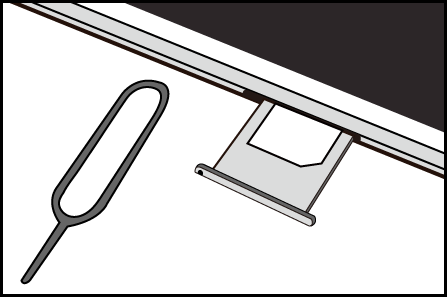
- SIMカードを挿入するだけでご利用いただけます。
- APN構成プロファイルのインストールは不要です。
- デュアルSIMでご利用の際、他社の「構成プロファイル」がインストールされていると通信できない場合があります。その場合は、「設定」>「一般」>「VPNとデバイス管理」から不要な構成プロファイルを削除してください。
For iPhone
- Simply insert the SIM card to start using the service.
- no APN configuration profile installation is required.
- Data communication may not work if another carrier’s “configuration profile” is installed. In that case, please delete any unnecessary configuration profiles from “Settings” > “General” > “VPN & Device Management.”
iPhone用户
- 只需插入SIM卡即可使用。
- 无需安装APN配置文件。
- 若已安装其他运营商的“配置文件”,可能无法进行数据通信。此时请前往“设置” > “通用” > “VPN与设备管理”,删除不需要的配置文件。
Androidの場合
-
・SIMカードを挿入するだけで通信できる場合があります。
- Wi-Fiオフ状態で「4G/5G」が表示され、通信できれば以下の設定は不要です
- ・通信できない場合は、以下の手順に沿って手動での設定(APN設定)を行ってください。
- ・機種やOSバージョンによって画面が異なる場合があります。
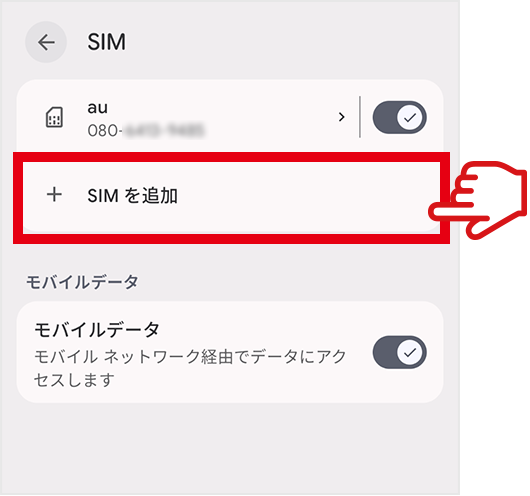
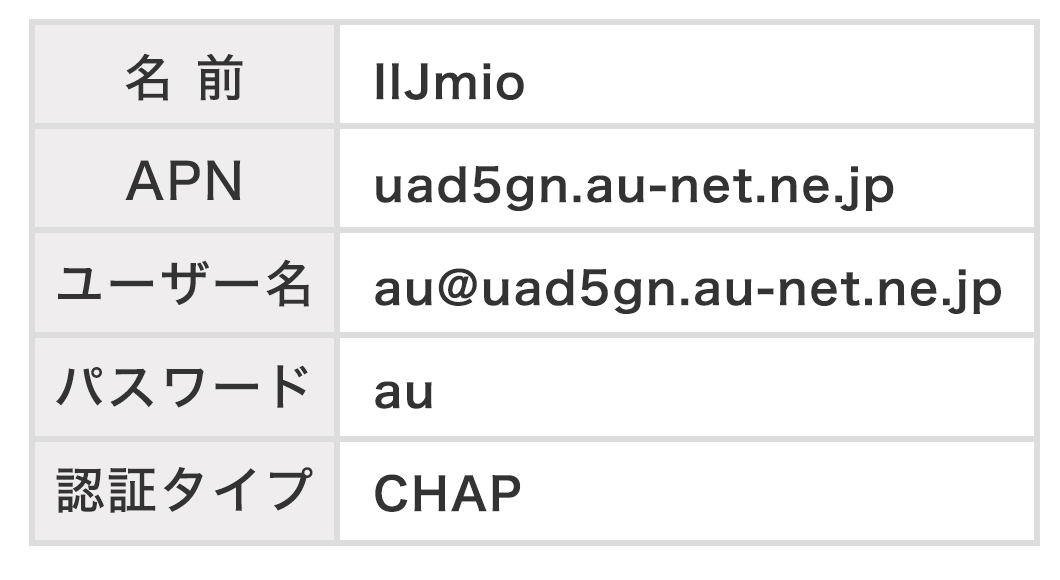
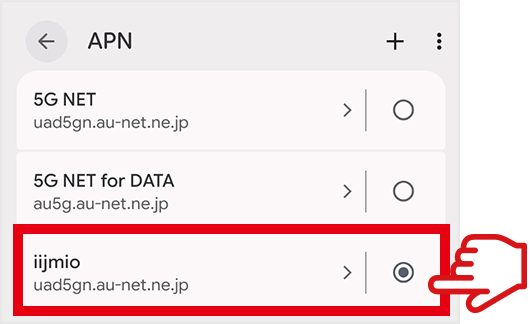
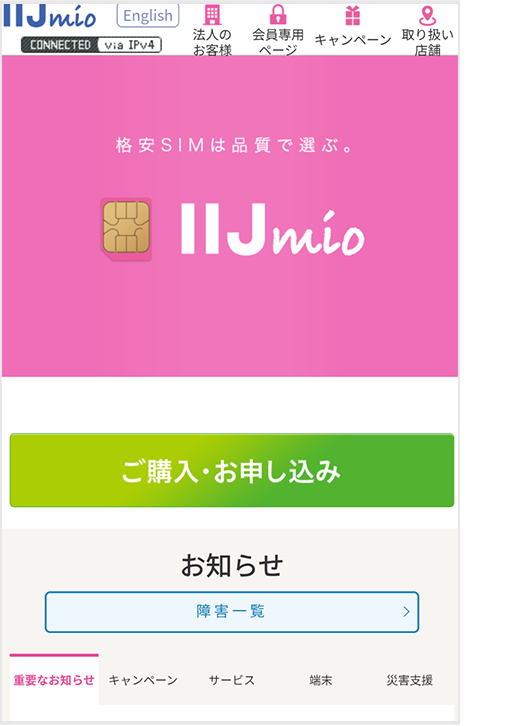
For Android
-
・In some cases, inserting the SIM card alone will enable data communication.
- If “4G/5G” is displayed and you can connect to the internet with Wi‑Fi turned off, the settings below are not required.
- ・If you cannot connect, please follow the steps below to configure the APN manually.
- ・The screen layout may vary depending on your device model and OS version.
-
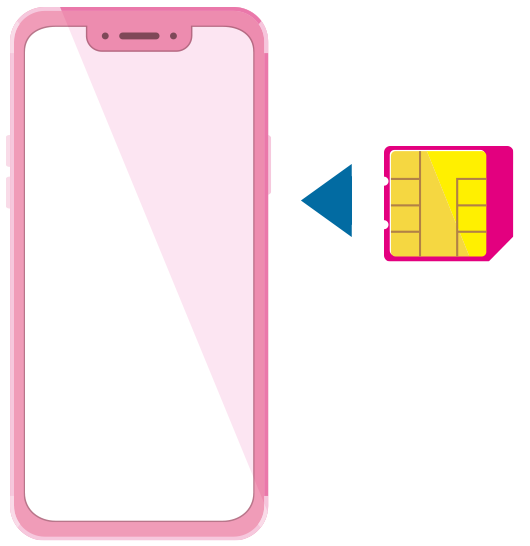
-
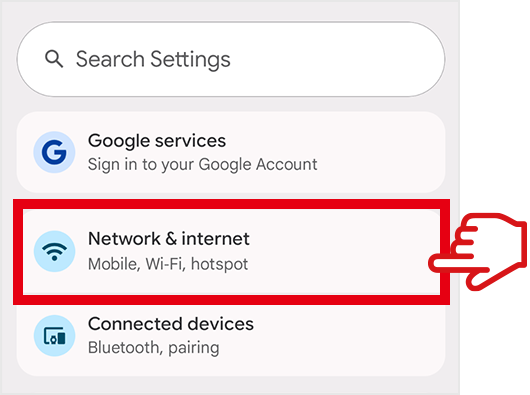
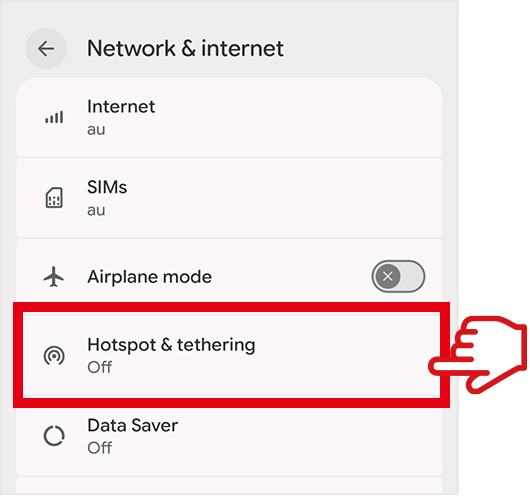
-
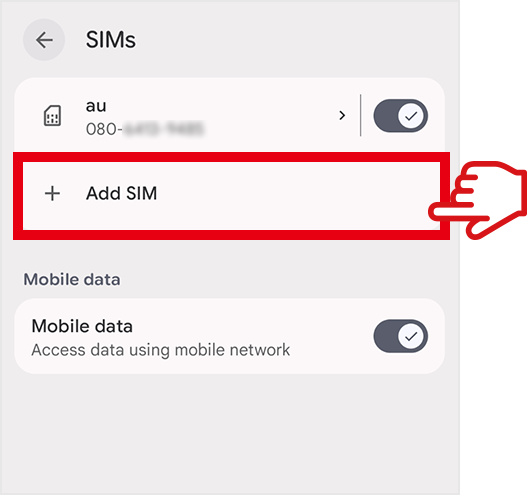
-
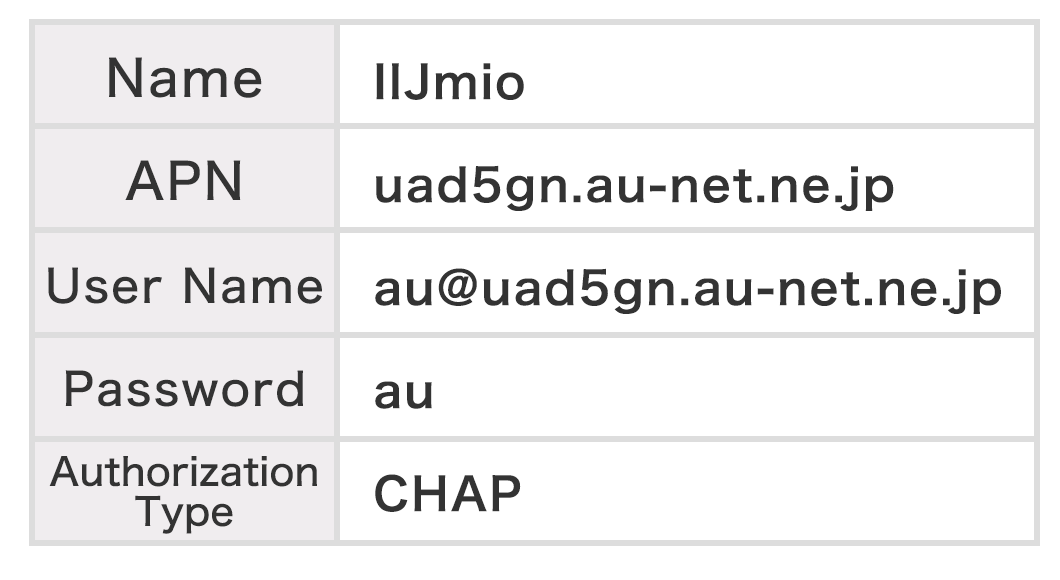
* When using a device that does not support 5G (a 4G device), please enter this APN information.
-
-
* If you cannot perform communication with tethering, please see here.
Android用户
-
・部分情况下,仅插入SIM卡即可使用数据通信。
- 在关闭Wi-Fi的状态下,如显示“4G/5G”且可以上网,则无需进行以下设置。
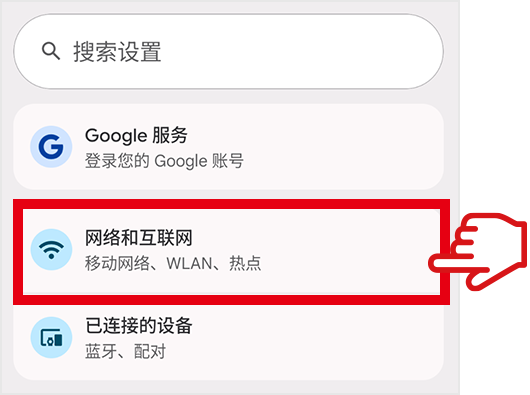
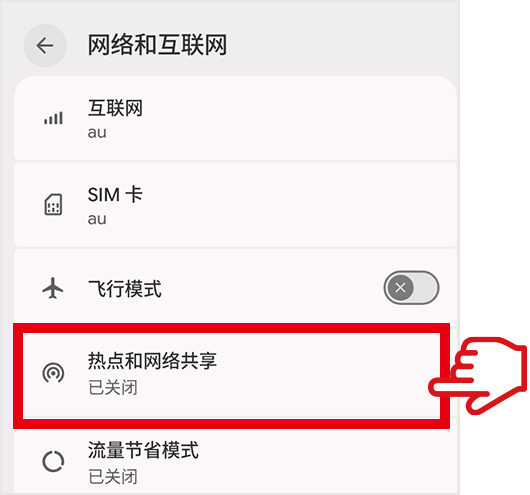
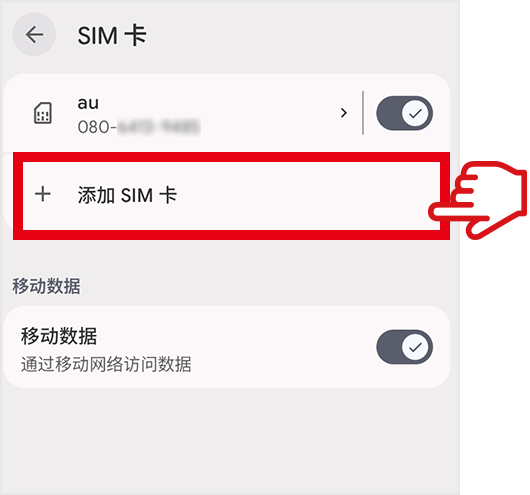
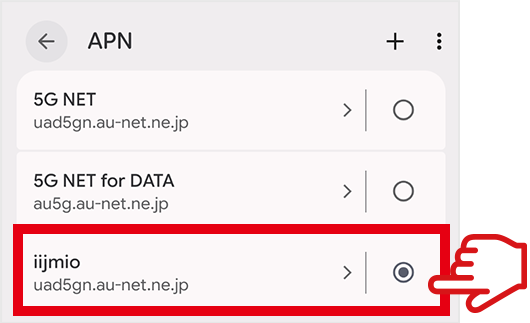
- ・若无法通信,请按照以下步骤进行手动设置(APN设置)。
- ・根据机型或Android系统版本不同,界面显示可能有所差异。
-
-
-
-
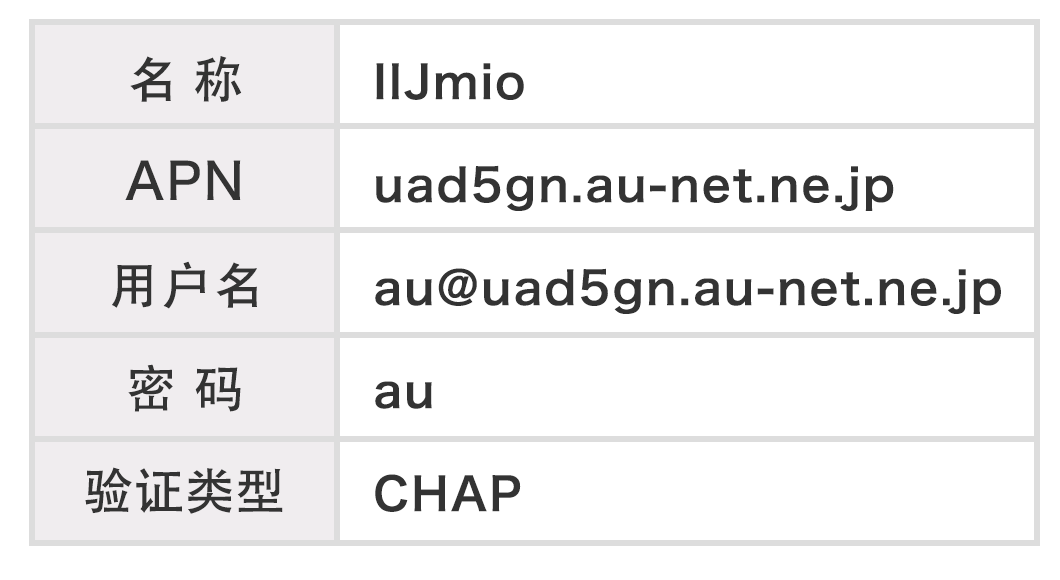
※若使用不支持5G(4G)的设备,请输入此处的APN信息。
-
-
※若无法开启热点通信,请查看此处。
よくあるご質問
FAQs
常见问题
- サポート窓口はありますか?
-
英語、中国語、日本語に対応したサポート窓口をご用意しています。
・よくある質問/AIチャットサポート(24時間対応)
・IIJサポートセンター(電話):
03-5205-4999
(9:00~19:00/年中無休)
※英語・中国語・日本語に対応しています。
- Japan Travel SIM Unlimitedの利用方法を教えてください。
-
Japan Travel SIM Unlimitedは、端末にSIMを設定することでご利用いただけます。
詳しいご利用方法は以下をご確認ください。
Japan Travel SIM Unlimitedのご利用の流れ
- 利用可能な端末の条件を教えてください。
-
ご利用予定の端末が、以下の条件を満たしているかご確認ください。
なお、すべての端末での動作を保証するものではありません。
- SIMフリー端末(SIMロック解除済み)であること
-
提供する周波数(バンド)に対応していること
<提供周波数>
5Gn78、n77、n257、n28、n3、n41、n40
4G LTEBand1、Band3、Band11、Band18/26、Band28、Band41、Band42
- Is there a support desk?
-
We offer customer support in English, Chinese, and Japanese.
・Q&A / AI Chat Support(Available 24/7)
・IIJ Support Center(TEL):
03-5205-4999
(Available every day from 9:00 to 19:00)
*Support available in English, Chinese, and Japanese.
- How do I use the Japan Travel SIM Unlimited?
-
Japan Travel SIM Unlimited can be used by setting up the SIM on a device.
For details on how to use the service, please see the following.
Easy to Use
- What are the requirements for compatible devices?
-
Please verify that the device you are planning to use meets the below conditions.
Note that operation on all devices is not guaranteed.
- Must be a SIM-free device (The SIM lock must be disengaged).
-
Must support an offered frequency (band).
<Offered frequencies>
5Gn78、n77、n257、n28、n3、n41、n40
4G LTEBand1、Band3、Band11、Band18/26、Band28、Band41、Band42
- 有客服窗口吗?
-
我们提供支持英语、中文和日语的客服窗口。
・常见问题 / AI聊天支持(24小时服务)
・IIJ支持中心(电话):
03-5205-4999
(全年无休,服务时间为9:00~19:00)
※支持英语、中文和日语。
- 如何使用 Japan Travel SIM Unlimited?
-
在设备中设置SIM后即可使用Japan Travel SIM Unlimited。
具体使用方法请查阅下文。
使用流程
- 可用设备的条件是什么?
-
请查看您将使用的设备是否满足以下条件。
且,不保证所有设备均可正常使用。
- 设备为无锁机型(已解除SIM锁)
-
支持所提供的频段
<提供频段>
5Gn78、n77、n257、n28、n3、n41、n40
4G LTEBand1、Band3、Band11、Band18/26、Band28、Band41、Band42
- APN設定方法を教えてください。
-
Android端末をご利用の場合、一部の端末ではAPN設定が必要です。
ご利用の端末により設定方法が異なりますので、該当する方法をご確認ください。
【5G端末をご利用の場合】
設定方法の詳細は以下をご確認ください。
Japan Travel SIM Unlimitedのご利用の流れ
【4G端末をご利用の場合】
設定方法は以下をご確認ください。
4G端末のAPN設定方法
- 4G端末のAPN設定方法を教えてください。
-
Android端末をご利用の場合、一部の端末ではAPN設定が必要です。
以下の手順に沿って設定を行ってください。
【設定方法】
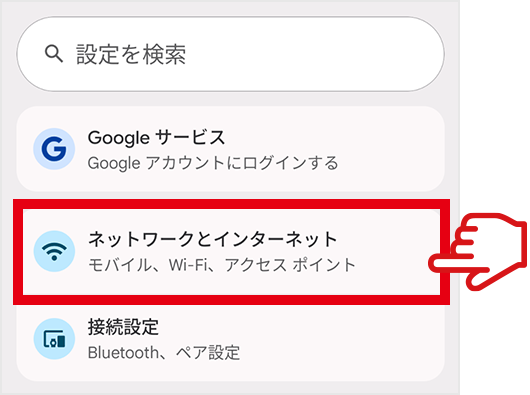
- ①「設定」>「ネットワークとインターネット」>「SIM」>「アクセスポイント名」を開きます。
- ②「+」を選択し、新しいAPNを作成します。
-
③以下のAPN情報を入力します。作成したAPNを保存します。
名前 IIJmio APN uno.au-net.ne.jp ユーザー名 685840734641020@uno.au-net.ne.jp パスワード KpyrR6BP 認証タイプ CHAP 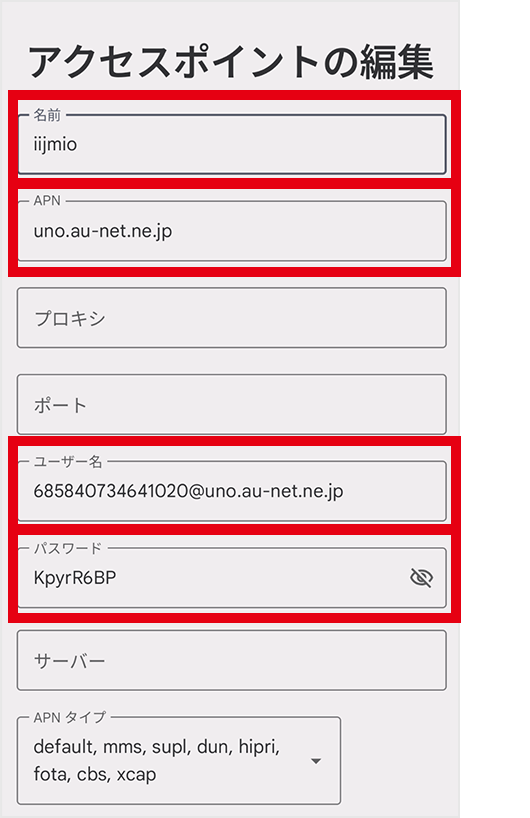
- ④作成したAPNを選択します。
- ⑤端末を再起動します。再起動後、Wi-Fiをオフにし、モバイルデータ通信でWebサイトが閲覧できるか確認します。
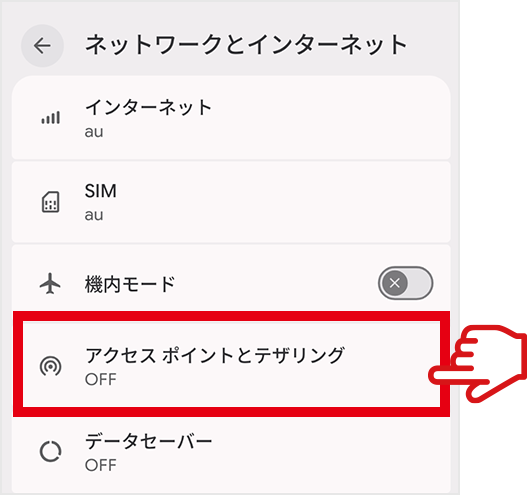
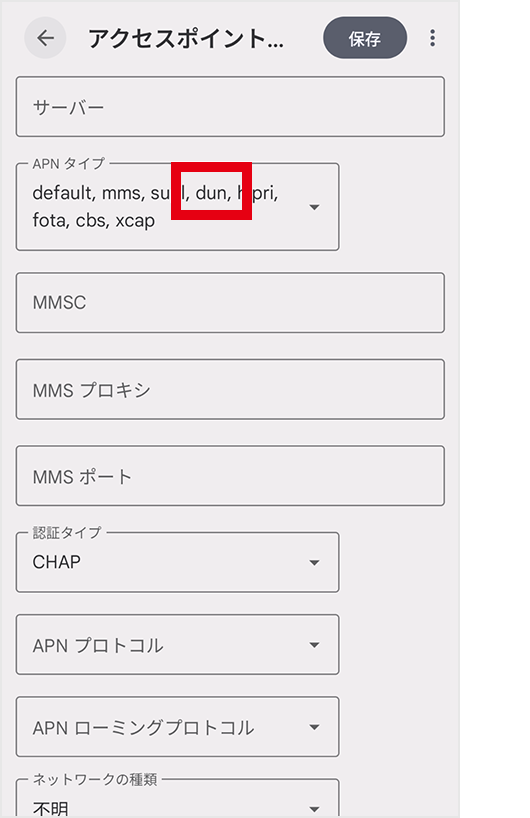
- テザリングが利用できない場合は、「APNタイプ」欄に「,dun」を追加してください。
- 機種やOSバージョンによって画面が異なる場合があります。
- テザリングが利用できません。
-
テザリングが利用できない場合は、以下をご確認ください。
【Androidをご利用の場合】
一部の端末では、テザリング利用時に追加の設定が必要な場合があります。
「APNタイプ」に「,dun」が設定されているかご確認ください。【設定方法】
「設定」>「ネットワークとインターネット」>「SIM」>「アクセスポイント名」>「作成したAPN」>「APNタイプ」欄に「,dun」を手動で追加してください。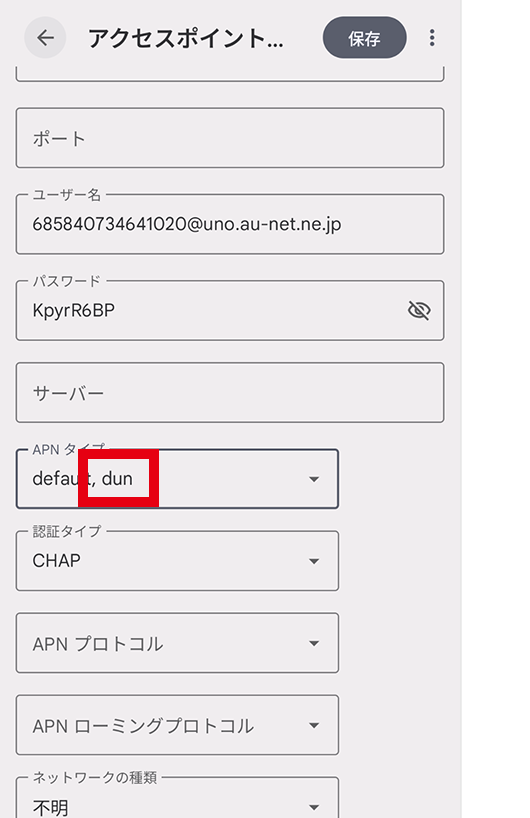
- 機種やOSバージョンによって画面が異なる場合があります。
- 誤って購入してしまいました。パッケージの返品・交換はできますか?
-
いいえ、返品・交換はできません。
- PINロックが掛かりました。PINロック解除コード(PUKコード)を教えてください。
-
PUKコードは、SIMカードの台紙に記載されています。
- PUKコードを規定回数以上誤入力すると、SIMカードがご利用いただけなくなります。 台紙を紛失した場合はサポートセンターまでお問い合わせください。
- データ通信は無制限ですか?
-
はい、基本無制限ですが、混雑時や大量通信時には制限を行う場合があります。また、テザリングにはプランごとに上限(9GB/14GB/30GB)があり、超過後は最大128kbpsに制限されます。
- Please explain how to set up the APN.
-
When using an Android device, an APN must be set up in certain devices.
As the method of setting up the APN differs depending on the device used, please verify the relevant method.
[When using a 5G device]
For details on how to set up the APN, please see the following.
Setting procedures
[When using a 4G device]
For details on how to set up the APN, please see the following.
Method of setting up APN on 4G device
- Please explain how to set up the APN on a 4G device.
-
When using an Android device, an APN must be set up in certain devices.
Please set up the APN while following the below procedure.
[How to set up]
- ①Go to “Settings” > “Network & Internet” > “SIM” > “au” > “Access Point Names.”
- ②Tap “+” to create a new APN.
-
③Enter the APN information as shown on the right. Save the APN you created.
Name IIJmio APN uno.au-net.ne.jp Username 685840734641020@uno.au-net.ne.jp Password KpyrR6BP Authentication Type CHAP 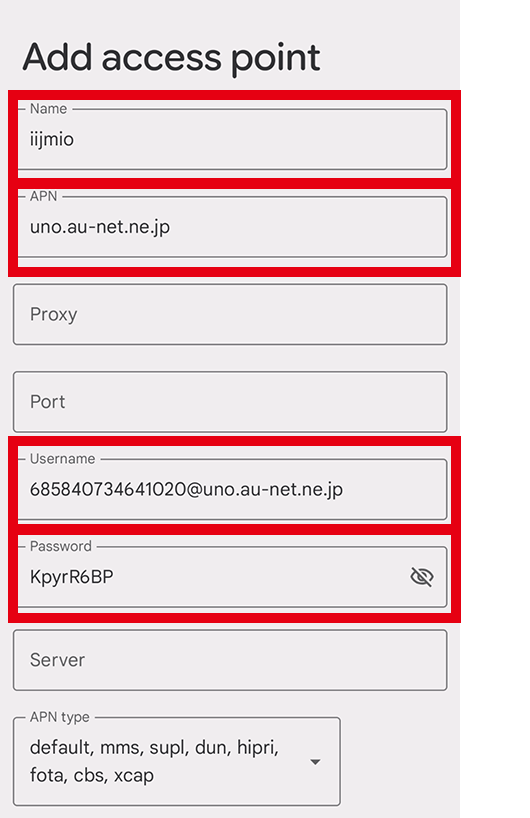
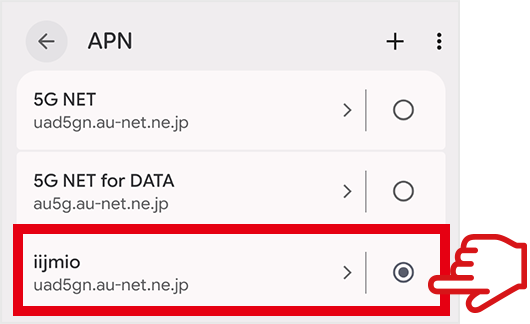
- ④Select the APN you created.
- ⑤Restart your device. After restarting, turn off Wi‑Fi and check whether you can access websites using mobile data.
- If you cannot use tethering, please add ",dun" to the "APN Type" field.
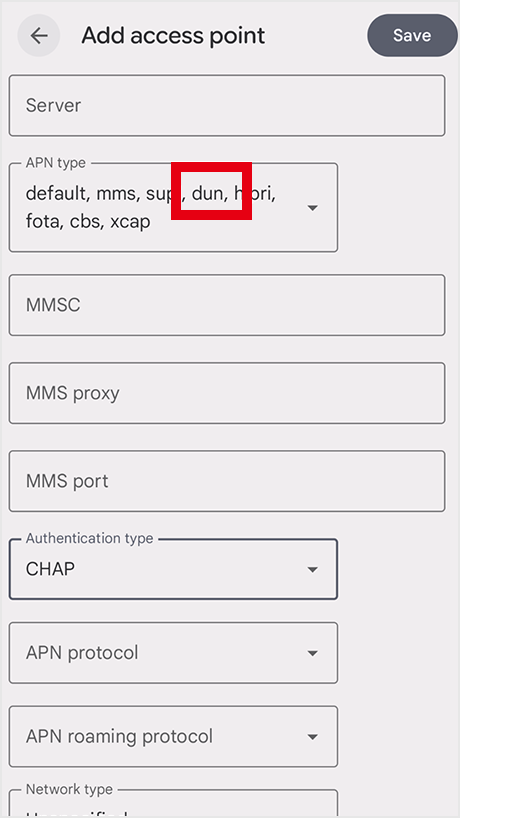
- The screen may differ depending on the device model and/or OS version.
- I cannot use tethering.
-
If you cannot use tethering, please see the following.
[For Android]
Certain devices require additional settings when using tethering.
Please verify whether ",dun" has been set in the "APN Type" field.[How to set up]
Please open "Settings," followed by "Network & Internet," "SIM," "Access Point Names," "Created APN" and "APN Type" in that order, then manually add ",dun" to the "APN Type" field.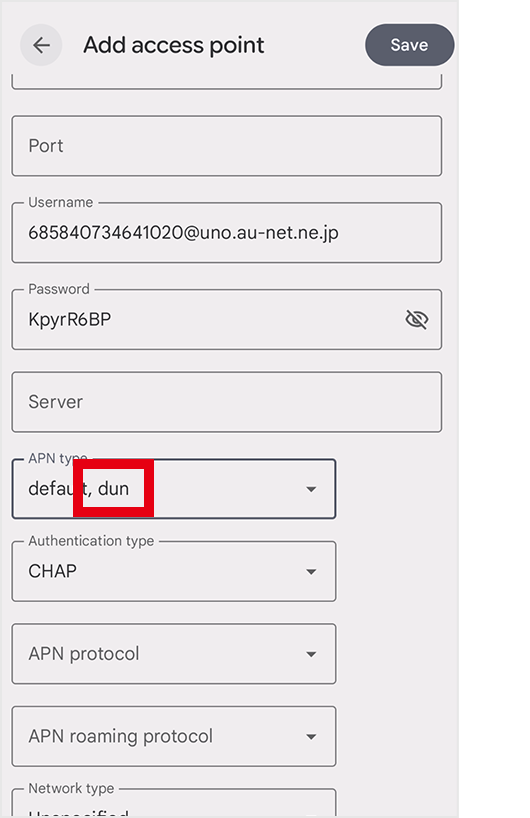
- The screen may differ depending on the device model and/or OS version.
- I purchased it by mistake. Can I return or exchange the package?
-
Japan Travel SIM Unlimited packages cannot be returned or exchanged.
- My SIM is PIN-locked. Can you provide the PIN Unlock Code (PUK code)?
-
The PUK code is indicated on the backing paper of the SIM card.
- Incorrectly entering the PUK code a certain number of times will render the SIM card unusable. If you misplaced the backing paper, please contact the Support Center.
- Is data communication unlimited?
-
Yes, it is generally unlimited. However, limits may be imposed during high traffic or large-volume communication. Tethering is also capped according to the plan (9GB/14GB/30GB). When these caps are exceeded, the internet speed is limited to a maximum of 128 kbps.
- 请告知APN的设置方法。
-
使用Android设备时,部分设备需要设置APN。
不同设备的设置方法不同,请确认相应的方法。
【使用5G设备时】
具体设置方法如下。
设置步骤
【使用4G设备时】
设置方法如下。
4G设备的APN设置方法
- 请告知4G设备的APN设置方法。
-
使用Android设备时,部分设备需要设置APN。
请按照以下步骤进行设置。
【设置方法】
- ①进入 “设置” > “网络与互联网” > “SIM卡” > “au” > “接入点名称”。
- ②点击“+”创建新的APN。
-
③按照右侧所示输入APN信息。保存创建的APN。
名称 IIJmio APN uno.au-net.ne.jp 用户名 685840734641020@uno.au-net.ne.jp 密码 KpyrR6BP 验证类型 CHAP 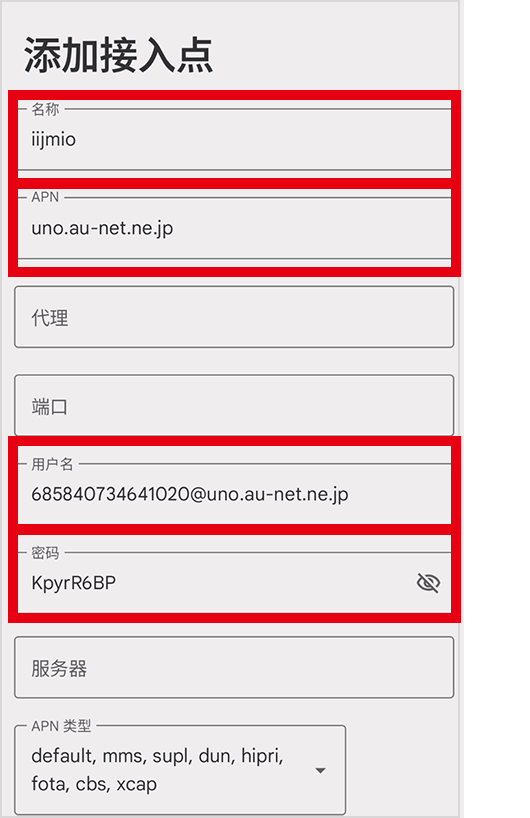
- ④选中您创建的APN。
- ⑤重启设备。重启后请关闭 Wi-Fi,确认是否可以通过移动数据访问网页。
- 如无法开启热点,请在“APN类型”栏中添加“,dun”
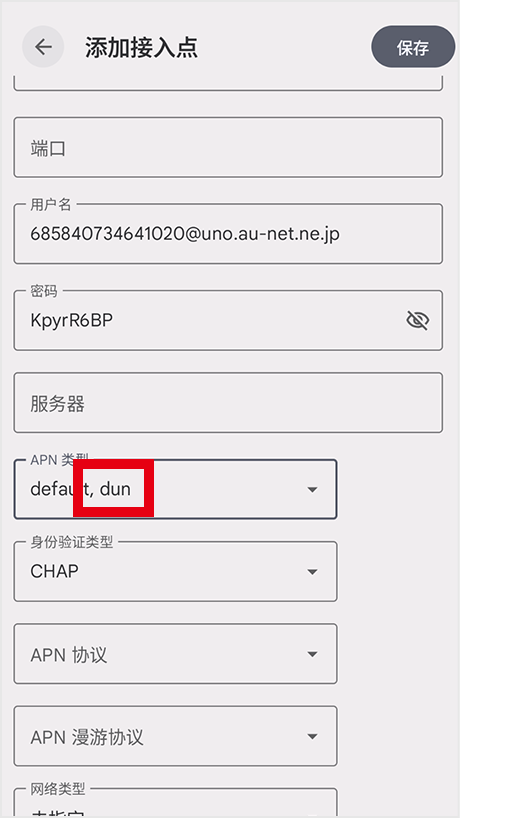
- 不同的机型或OS版本有可能画面会不同。
- 无法使用热点。
-
无法使用热点时请查看下文。
【Android用户】
部分设备有时需要在开启热点时追加设置。
请查看“APN类型”中是否设置了“,dun”。【设置方法】
请在“设置”>“网络与互联网”>“SIM”>“接入点名称”>“创建的APN”>“APN类型”栏中手动添加“,dun”。
- 不同的机型或OS版本有可能画面会不同。
- 我不小心购买了,可以退换包装吗?
-
Japan Travel SIM Unlimited的包装不可退货或更换。
- SIM卡被PIN锁定了。可以提供PIN解锁码(PUK码)吗?
-
PUK码写在SIM卡的卡托上。
- PUK码输错超过规定次数,SIM卡将无法使用。若卡托丢失,请咨询客服中心。
- 是不限流量吗?
-
是的,原则上不限流量。但当网络拥堵或大流量通信时,可能会受到限制。另外,开启热点通信时各套餐分别设置了上限(9GB/14GB/30GB),超出上限后,通信速度将被限制至最高128kbps。
販売場所
Where to buy
发售地点




- 各販売店によりお取り扱い状況が異なります。
- Availability may differ at some outlets.
- 各销售店的销售情况可能有所不同。
お問い合わせ窓口
Customer support
客服窗口
AI Chat Support
IIJ Support Center
Telephone(Paid)

03-5205-4999
available year-round(9:00-19:00)
※Customer support is available in Japanese, English, and Chinese only.